iLoveGantt
Free online Gantt chart and project timeline creation tool with AI integration, no signup required.
🔗 Visit iLoveGantt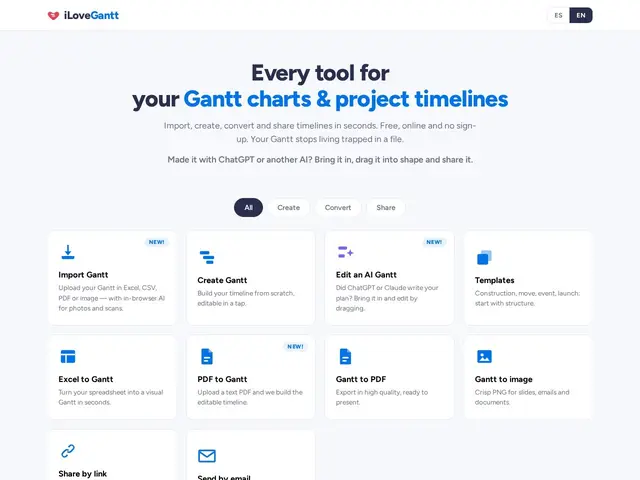
Description
Building a project timeline usually means either wrestling with a spreadsheet until the dates align, or paying for a project-management platform just to get one Gantt chart out of it. iLoveGantt skips both: it's a free, no-signup web tool that turns a spreadsheet, PDF, or even an AI chatbot's project plan into a proper drag-and-drop Gantt chart in a couple of clicks.
The standout feature is AI-assisted import — you can paste output straight from ChatGPT or Claude (a project plan described in plain text) and iLoveGantt will parse it into a structured timeline, on top of more conventional Excel/CSV/PDF/image imports. Charts are editable by drag-and-drop, exportable to PDF, PNG, or Excel, and shareable via link or email, with template options for construction, events, and product launches — all without requiring an account for the core functionality.
💬 Our review
The short version: iLoveGantt is genuinely useful for the specific job of 'I need a Gantt chart right now and don't want to sign up for anything,' and the AI-import angle is a real point of difference, not just a marketing bullet.
Against TeamGantt or Instagantt, which are subscription tools built for ongoing project tracking with team collaboration, iLoveGantt is closer to a single-use utility: make a chart, export it, done — there's no persistent workspace or task-assignment layer described anywhere on the site. That's fine if you need a one-off timeline for a proposal or a quick visual, but it means iLoveGantt isn't a substitute for a real project-management tool if you need ongoing tracking, notifications, or team accountability. The lack of any visible pricing page or upgrade path is also worth flagging — it's unclear whether 'free' is permanent or a pre-monetization phase.
💰 Pricing
📊 Global score
🤖 AI-enriched data
Entièrement gratuit, aucune inscription requise pour les fonctionnalités de base. Aucune grille tarifaire publiée.
Pros
Gratuit, sans inscription, pour l'usage de base
Import assisté par IA depuis ChatGPT/Claude
Formats d'import variés (Excel, CSV, PDF, images)
Export PDF/PNG/Excel et partage par lien
Cons
Pas d'espace de travail persistant ni de suivi d'équipe (outil ponctuel, pas de gestion de projet continue)
Aucune grille tarifaire visible — modèle économique futur incertain
Pas d'attribution de tâches ni de notifications