Macro
All-in-one workspace that bundles documents, tasks, team chat, email, and a CRM into one connected system, so information from any of them can be linked together instead of scattered across separate apps.
🔗 Visit Macro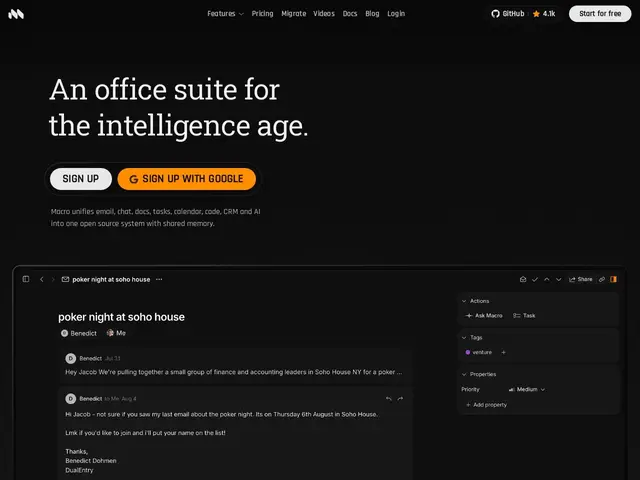
Description
Most teams run their day across a handful of disconnected apps — Slack for chat, Notion for docs, a separate CRM, and an email client — and end up copy-pasting context between all of them. Macro's pitch is to put documents, tasks, chat, email, and a CRM inside one workspace where any piece — a task, a doc, a contact — can be @mentioned and linked to any other, so the context travels with the work instead of getting lost between tabs.
Under the hood, documents are collaborative in real time using CRDT technology (the same class of tech behind tools like Figma's live multiplayer editing), the whole interface is built keyboard-first for speed, and an AI layer builds a shared team memory automatically each night from what the team has been doing, rather than requiring someone to manually maintain a wiki. The codebase is open source, written in Rust and SolidJS. It's a genuinely ambitious all-in-one bet, going up against category leaders (Slack, Notion, ClickUp) that are each individually more mature in their own lane.
💬 Our review
The short version: Macro is an ambitious, technically serious all-in-one workspace with real engineering behind it (CRDT docs, open-source Rust/SolidJS core, nightly AI memory), but all-in-one suites face a structural uphill battle — you have to be good enough at five things at once to displace teams already invested in five separate best-of-breed tools.
💰 Pricing
📊 Global score
🤖 AI-enriched data
Free tier available; premium tier priced at approximately $40/month per the homepage, with detailed tier breakdown not fully specified publicly.
Pros
Genuinely unifies email, chat, docs, tasks, and CRM in one linked system
Real-time collaborative documents built on CRDT technology
Nightly AI-built shared team memory, no manual wiki upkeep
Open-source codebase (Rust + SolidJS) offers technical transparency
Keyboard-first design aimed at power users who want speed
Cons
High switching cost from entrenched tools like Slack, Notion, and a dedicated CRM
Individual modules likely less mature than best-of-breed specialists in each category
Much smaller user base and network effects than category leaders
Keyboard-first UI has a learning curve for teams used to point-and-click tools
Pricing detail isn't fully transparent publicly at the tier level