Will Be Done
Most to-do apps show you a single flat list or a single day at a time, which makes it hard to see whether your whole week is realistic until it's already too late. Will Be Done takes a different appro
🔗 Visit Will Be Done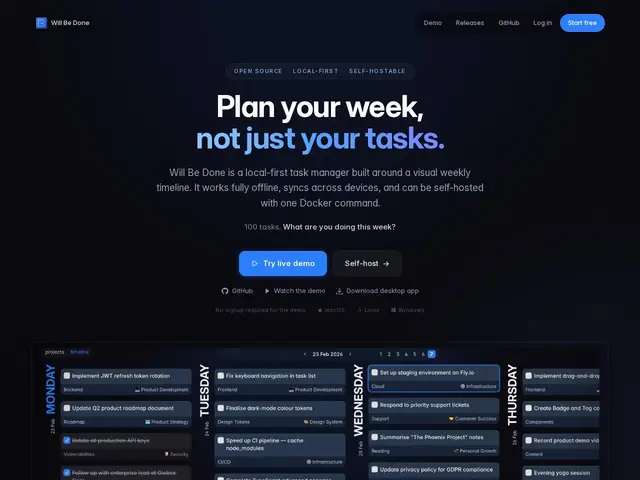
Description
Most to-do apps show you a single flat list or a single day at a time, which makes it hard to see whether your whole week is realistic until it's already too late. Will Be Done takes a different approach: every day of the week is its own column, side by side, so you can see at a glance what you've committed to and drag tasks between days when plans change — the way you'd rearrange sticky notes on a wall planner.
Will Be Done is free and open source (AGPL-3.0), and genuinely local-first: it keeps a full database on your own device, so tasks stay available and editable offline, syncing across devices and browser tabs whenever a connection is available. It's keyboard-first with Vim-style navigation for people who'd rather not touch the mouse, and it's available as a hosted web app, an installable progressive web app, or a native desktop app for Windows, macOS, and Linux. For anyone who wants full control, a Docker image handles self-hosting, defaulting to SQLite with no Redis or external database required.
💬 Our review
The short version: Will Be Done is a strong pick specifically if you think in weeks rather than single days, and it costs nothing whether you self-host or use the hosted version.
Against Todoist or TickTick, the established names in this space, the real differentiator is the weekly column layout as the primary view rather than a bolted-on calendar feature, combined with a genuinely local-first architecture — your data lives on your device first, syncing when possible, rather than requiring a live connection to function. Against Super Productivity, which shares some of the self-hosted, keyboard-driven spirit, Will Be Done leans more specifically into the weekly-planning metaphor as its core identity. The honest limitations are real for some users: it's single-user only with no team collaboration on the roadmap, there's no time-of-day scheduling (it's day columns, not an hourly calendar), and end-to-end encryption for sync isn't implemented yet, which matters if you plan to self-host with sensitive task data. For an individual who plans their work week visually and wants a fast, offline-capable, no-paywall task manager, Will Be Done is worth switching to; teams needing shared boards or hour-by-hour scheduling should look elsewhere.
💰 Pricing
📊 Global score
🤖 AI-enriched data
Version auto-hébergée Docker gratuite à vie (AGPL-3.0), aucune fonctionnalité payante requise. Palier cloud freemium en développement.
Pros
Architecture véritablement hors-ligne, base de données locale complète
Navigation clavier façon Vim et ajout rapide sans interruption
Auto-hébergeable via Docker, aucune fonctionnalité payante
Lecture/écriture locale rapide, sans temps de chargement
Applications desktop pour Windows, macOS et Linux
Cons
Mono-utilisateur uniquement, pas de collaboration d'équipe prévue
Pas de planification par heure, seulement par semaine
Chiffrement de bout en bout pas encore implémenté
Mobile uniquement en PWA, apps natives à venir