Haftio
A visual planner that works like a whiteboard instead of a to-do list — you keep separate threads for each project or habit, add notes as things happen, and zoom out any time to see everything at once without last week's context disappearing.
🔗 Visit Haftio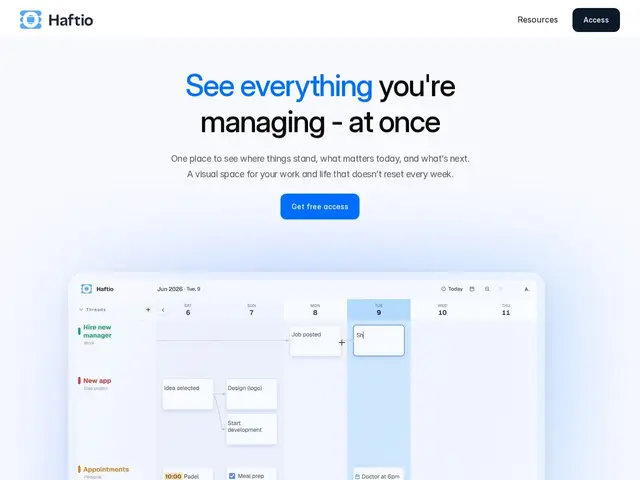
Description
Most planning apps force you into a weekly or daily view that resets and quietly erases the context of what you were doing three weeks ago on a slow-moving project. Haftio's answer is a continuous canvas: instead of a calendar grid, you get a whiteboard-like space made of "threads" — one per project, client, habit, or area of life — where you drop entries as things happen and can zoom out any time to see the whole picture, including things that stalled or are coming up.
Haftio is a browser-based visual planning tool aimed at people juggling multiple ongoing projects who think in patterns rather than lists. Each thread holds dated entries with checkboxes, tags, and reminders, and entries can link across threads (e.g. a task tied to both a client and a personal habit). It's currently free to use with no publicly listed paid tier, which is worth noting for a tool this early — pricing and durability are open questions. It sits closer to Notion or Roam Research's networked-notes philosophy than to a classic task manager like Todoist.
💬 Our review
The short version: if list-based to-do apps make you lose track of slow-burn projects because everything resets weekly, Haftio's continuous-canvas approach is worth trying, especially since it's currently free.
Compared to Notion (far more powerful and flexible, but requires you to build your own system from blocks and databases) or Roam Research/Obsidian (networked notes, steeper learning curve, built for knowledge management more than day-to-day task tracking), Haftio's pitch is a narrower, more opinionated visual metaphor that's ready to use immediately without setup. The trade-off is that it's a young, single-purpose product with no announced pricing — there's real risk it either shuts down, gets acquired, or introduces a paywall on features you're already relying on. For someone who specifically struggles with "where did that project thread go" in list-based tools, it's worth a free trial; for anyone who wants one tool to also handle databases, wikis, or team collaboration, Notion remains the safer long-term bet.
💰 Pricing
📊 Global score
🤖 AI-enriched data
Accès gratuit, aucun palier payant annoncé publiquement pour l'instant
Pros
Vue canvas continue — pas de reset hebdomadaire qui fait perdre le contexte
Organisation par threads (un par projet/habitude/domaine), liables entre eux
Prise en main immédiate, sans construire son propre système comme sur Notion
Gratuit à ce stade
Cons
Aucun modèle de prix publié — pérennité et évolution future incertaines
Produit jeune, communauté et intégrations limitées comparé à Notion/Obsidian
Pas de gestion d'équipe ou de collaboration multi-utilisateurs mentionnée
Moins polyvalent qu'un outil tout-en-un (pas de base de données, wiki structuré)