SetDPI
Free browser tool that changes an image's DPI metadata without re-encoding it, for print-ready files.
🔗 Visit SetDPI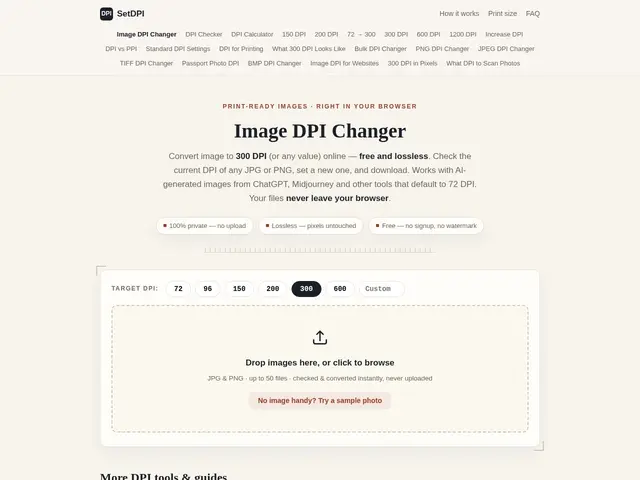
Description
Print shops, Amazon KDP, and Etsy often reject an otherwise perfectly good image because its DPI (dots-per-inch) metadata says 72 instead of 300 — even though the actual pixel quality is fine, especially common with AI-generated images from tools like ChatGPT or Midjourney. SetDPI fixes just that one number in the file, in your browser, without recompressing or altering the image itself, so you get a print-accepted file in seconds instead of fighting with desktop software.
It's a free, no-signup, client-side web tool: files never leave your browser, so there's no privacy concern with uploading sensitive images. It supports batch processing of up to 50 files at once, offers preset DPI values (72, 96, 150, 200, 300, 600), and is limited to JPG and PNG. It's aimed at print shops, self-publishers, and academic authors, and it can only change the metadata value, not the actual pixel resolution.
💬 Our review
The short version: SetDPI does one very specific, very common job — fixing DPI metadata so print services stop rejecting your file — and does it for free with zero friction, which is hard to beat for a task this narrow.
Compared to general image editors like Photoshop or GIMP, which can also change DPI metadata but require installing software and navigating a full editing interface, SetDPI is purpose-built for exactly this one task and gets it done in seconds via drag-and-drop, entirely client-side for privacy. It won't help if your actual pixel resolution is too low — it can't manufacture detail that isn't there, only relabel the metadata — so it solves the "my print service rejected this for DPI" problem specifically, not a genuine low-resolution problem. For that narrow but common need, it's hard to beat being free, private, and instant.
💰 Pricing
📊 Global score
🤖 AI-enriched data
Completely free, no signup
Pros
Lossless metadata-only editing
Batch processing
Client-side privacy
Free with no limits
Cons
JPG/PNG only
Cannot increase actual resolution
Requires modern browser