JogPad
A free macOS app that lets you capture any selected text with a double-tap of Shift, storing it in a floating pad you can search and reuse later.
🔗 Visit JogPad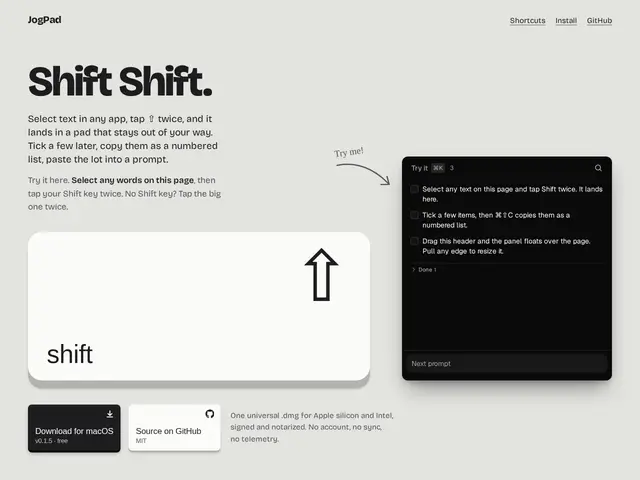
Description
Most people copy text the same tedious way: select it, hit Cmd+C, switch windows, paste, and hope they didn't overwrite an earlier clipboard item they still needed. JogPad replaces that with one gesture — double-tap Shift on any selected text anywhere on your Mac, and it lands in a floating pad you can come back to, search, and organize, without ever stealing focus from what you were doing.
Technically, JogPad organizes captured snippets across multiple pages with keyboard shortcuts (Cmd+K for the page menu, Cmd+F to search everything), and stores everything as plain markdown locally on disk — no account, no cloud sync, no telemetry. It's open source under the MIT license, ships as a universal binary for Apple Silicon and Intel, and requires Accessibility and Input Monitoring permissions to work. It's a genuinely small, single-purpose tool built by an independent developer, not a full note-taking app.
💬 Our review
The short version: JogPad is what you'd build if you were annoyed at losing snippets to an overwritten clipboard, and it fixes exactly that one annoyance without trying to become a full notes app.
The gesture itself — double-Shift, no menu, no hotkey to remember — is the kind of small interaction design detail that makes a tool actually get used daily instead of forgotten after a week. Storing everything as local plain markdown with zero account or telemetry is a real point in its favor if you're wary of yet another app phoning home with your text. The tradeoffs are equally honest: it's macOS-only, there's no cloud sync so your snippets don't follow you to another machine, and the whole markdown file gets rewritten on every edit, which limits how far this could scale for heavy, structured note-taking. Worth it if you frequently grab text snippets — for prompts, research, quotes — and want zero setup; skip it if you need cross-device sync or a real knowledge base, where a tool like Notion or Obsidian is the better fit.
💰 Pricing
📊 Global score
🤖 AI-enriched data
Application 100% gratuite, code source ouvert sous licence MIT.
Pros
Geste double-Shift instantané, aucun raccourci à mémoriser
Stockage local en markdown brut, zéro compte, zéro télémétrie
Open source (MIT), binaire universel Apple Silicon/Intel
N'interfère pas avec l'usage normal de la touche Shift ailleurs
Cons
macOS uniquement
Pas de synchronisation cloud entre appareils
Fichier markdown entier réécrit à chaque édition
Nécessite deux autorisations système macOS (Accessibilité + Surveillance des entrées)