Mado
A native macOS app for developers who live in the terminal, replacing tabs and window-juggling with organized split panes, themes, and keyboard shortcuts.
🔗 Visit Mado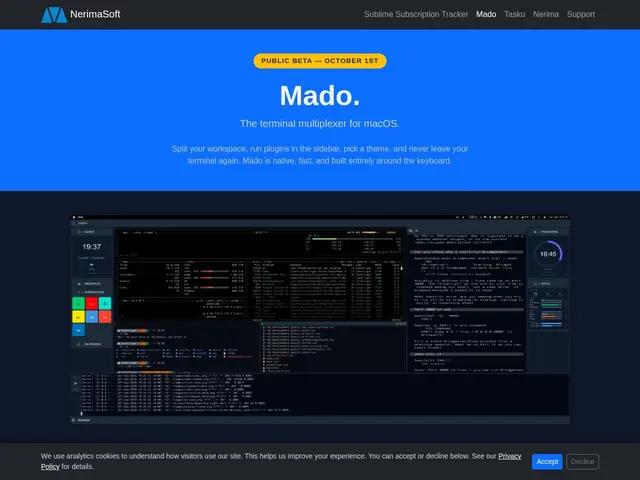
Description
If you've ever had ten terminal tabs open and lost track of which one was running your dev server versus your test suite, Mado is built for exactly that problem. Instead of stacking terminal windows and tabs, it organizes everything into a single workspace of split panes you navigate entirely by keyboard.
Mado is a native macOS terminal multiplexer built in Rust, positioned as a faster, native alternative to tools like tmux or Electron-based terminal apps. It replaces tab/window switching with split panes, keyboard-driven navigation (including a Cmd+/ shortcut to discover commands), and automatic layout restoration between sessions. It ships with 22 hand-crafted themes based on Tailwind's color palettes and an extensible plugin system that already includes a clock, a Pomodoro timer, clipboard history, and an AI assistant, plus native integration with a companion task manager called Tasku.
💬 Our review
The short version: Mado looks like a genuinely fast, well-designed native alternative to tmux for macOS developers who want a terminal workspace rather than a pile of tabs — but it's macOS-only, still in pre-beta, and asks you to bet on a young open-source tool before it's proven itself in daily use.
tmux remains the default for terminal multiplexing precisely because it's free, battle-tested, and cross-platform, but its keybinding-heavy configuration has a real learning curve; Mado's pitch is doing the same job with a friendlier, discoverable command palette and native macOS performance instead of a terminal-inside-a-terminal. iTerm2 and WezTerm are the closer comparisons as native terminal apps, and Mado's differentiator is baking multiplexing, theming, and small productivity plugins (Pomodoro, clipboard history) into one opinionated package rather than requiring separate tools. Being free and open source makes it low-risk to try once the public beta ships October 1, 2026, but Linux/Windows users and anyone needing a production-proven setup today should stick with tmux or WezTerm for now.
📊 Global score
🤖 AI-enriched data
Gratuit, open source. Bêta publique prévue le 1er octobre 2026.
Pros
Performance native, démarrage rapide et faible empreinte mémoire (Rust, pas Electron)
Design clavier-centrique avec raccourci Cmd+/ pour la découverte des commandes
22 thèmes conçus à la main, basés sur les palettes Tailwind
Système de plugins extensible : horloge, Pomodoro, presse-papiers, assistant IA
Cons
macOS uniquement au lancement ; Linux et Windows prévus plus tard
Nécessite macOS Ventura 13 ou supérieur
Bêta publique au 1er octobre 2026 — pas encore en production stable