Serverbox
Free desktop app that gives Linux server admins a live dashboard, real terminal, file manager and Docker controls over plain SSH — nothing to install on the servers themselves.
🔗 Visit Serverbox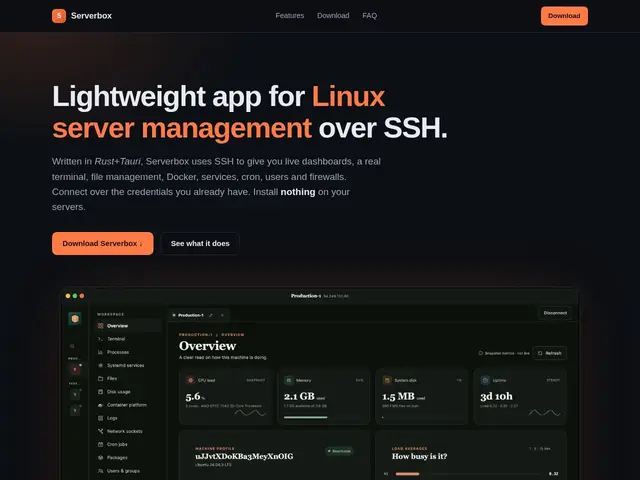
Description
If you look after a few Linux servers, you probably already juggle several terminal windows and try to remember which box has which service running. Serverbox puts all of that behind one desktop window instead: a live dashboard, a terminal, and a file browser for every server you manage, without installing any special software on the servers.
Serverbox is a native desktop app that connects to Linux servers purely over standard SSH — there's no agent to deploy server-side. It gives you multi-server workspaces with tagging and search, a real terminal with persistent sessions, and live monitoring of CPU, memory, disk, network, and running processes. Beyond dashboards, it covers actual admin work: systemd/service management, Docker and Podman support with automatic Compose project discovery, a file manager with upload/download, a cron job editor, user and group management, and read access to UFW/firewalld firewall rules. Credentials are kept in an encrypted local vault, and it supports jump hosts/bastions for servers behind a gateway. It's free, requires no account, and collects no telemetry, currently at version 1.0.2.
💬 Our review
The short version: Serverbox is a solid free replacement for juggling multiple SSH terminal tabs plus a separate monitoring tool, especially if you run a handful of personal or small-business Linux boxes and don't want to install a monitoring agent on each one.
Against Cockpit or Webmin, both of which require you to set up a web UI on every server individually, Serverbox's whole pitch is that it's agentless and centralizes several machines into one desktop view over plain SSH. Against Termius, which is a strong SSH client but stops at terminal and basic file transfer, Serverbox adds the live systemd/Docker dashboards and firewall visibility that Termius doesn't attempt. Portainer is Docker-only and needs its own agent per host, so it doesn't compete directly here. At zero cost with no telemetry, there's genuinely little downside for a homelab or small-fleet admin. The real thing to weigh before adopting it: it's a single-vendor desktop app holding your SSH credentials (even if vaulted and encrypted locally), and its open-source status isn't confirmed, so anyone managing production infrastructure should check that before wiring in real credentials.
💰 Pricing
📊 Global score
🤖 AI-enriched data
Application gratuite, sans compte requis ni télémétrie
Pros
Gestion sans agent, tout passe par SSH standard
Tableau de bord temps réel multi-serveurs
Terminal réel avec persistance de session
Coffre-fort d'identifiants chiffré intégré
Cons
Application de bureau uniquement, pas d'accès web ou mobile
Statut open source non confirmé
Confier ses identifiants SSH à un seul outil tiers