LaunchAgent Studio
A visual macOS GUI for creating and managing launchd tasks and automation schedules without manual plist editing.
🔗 Visit LaunchAgent Studio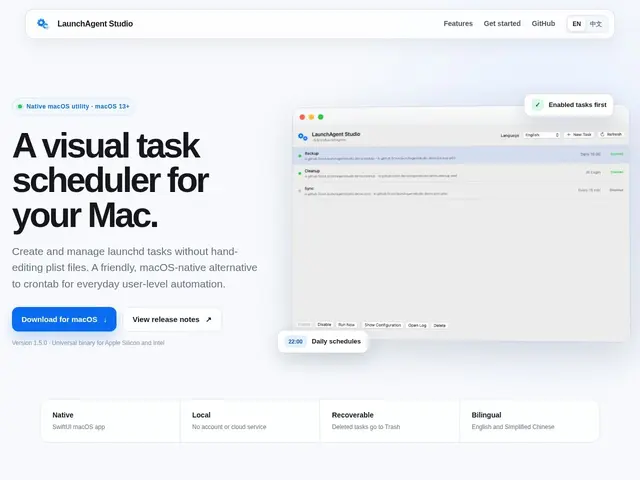
Description
Mac users who want a task to run automatically — a backup script every night, a reminder every morning — usually have to hand-write a special XML configuration file and drop it in a hidden system folder, with no visual feedback if it's wrong. LaunchAgent Studio replaces that with a normal-looking app: pick a program or script, set a schedule, click save.
LaunchAgent Studio is a native SwiftUI macOS application that gives launchd (macOS's built-in task scheduler) a graphical front end, so users can create, enable, disable, run, inspect and log automation tasks without hand-editing plist files. It supports daily, login, and interval-based triggers for applications, shell scripts, and commands, runs entirely locally with no cloud services or account required, and offers a bilingual interface (English and Simplified Chinese). Deleted tasks are recoverable via Trash, and it ships as a universal binary for both Apple Silicon and Intel Macs. It only manages user-level LaunchAgents, not system-wide LaunchDaemons, and requires macOS 13 or later. It's free and open source, with its code available on GitHub.
💬 Our review
The short version: if you're a Mac user who's ever fought with crontab or plist files just to run a script automatically, LaunchAgent Studio is a free, no-nonsense way to skip that entirely.
Its main competitors are Lingon X (a similar plist GUI, but paid) and general automation apps like Keyboard Maestro or Automator, which do far more but also cost money and carry more complexity than a simple scheduled task needs. Being free, open source, fully local with no account required, and covering the exact same launchd mechanism Lingon X wraps makes LaunchAgent Studio an easy default choice for straightforward scheduling needs. The real limits are scope, not quality: it only manages user-level tasks (no system LaunchDaemons), it's macOS-only, requires macOS 13+, and as a newer open-source project it has a much smaller community and track record than long-established alternatives. For anyone just wanting a GUI to schedule a script or app reliably without touching a terminal, it does the job well and costs nothing; for system-level automation or cross-platform needs, look elsewhere.
💰 Pricing
📊 Global score
🤖 AI-enriched data
Gratuit et open source, code disponible sur GitHub
Pros
Élimine complètement l'édition manuelle de fichiers plist
100% local, aucune dépendance cloud ni compte requis
Open source avec dépôt GitHub actif
Gratuit, sans abonnement ni licence
Cons
Tâches niveau utilisateur seulement, pas de gestion des LaunchDaemons système
Exclusif à macOS, aucun support Windows/Linux
Nécessite macOS 13 ou plus récent
Communauté plus restreinte que les alternatives établies comme Lingon X