Clean That Sheet
Online spreadsheet cleaning tool that identifies and fixes messy data in Excel, CSV, and Google Sheets files. Users upload files for a free preview showing detected issues, then pay to unlock fully cleaned versions.
🔗 Visit Clean That Sheet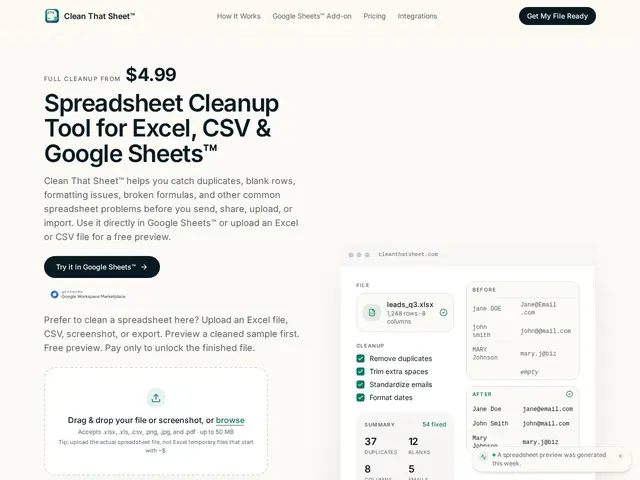
Description
Anyone who has inherited a spreadsheet full of duplicate rows, inconsistent date formats, and stray typos in email addresses knows how tedious it is to clean up by hand. Clean That Sheet lets you upload that messy file, see exactly what's wrong with it for free, and only pay once you decide the cleaned version is worth it.
Clean That Sheet is an online spreadsheet-cleaning tool for Excel, CSV and Google Sheets files. It removes duplicate and blank rows, standardizes date and number formats, trims stray whitespace, fixes inconsistent text casing, flags invalid emails and obvious data errors, normalizes column headers, and repairs broken formulas — generating a detailed change report alongside the cleaned file. It accepts Excel (.xlsx, .xls), CSV, and even screenshots or PDFs of tabular data, and always shows a free preview of detected issues before you pay. Pricing is pay-per-file: $4.99 for a standard cleanup, $9.99 for a large file, with no login required to see the preview. For recurring Google Sheets cleanup, a separate add-on called Guard Pro costs $9.99/month for unlimited checks and cleanups.
💬 Our review
The short version: Clean That Sheet is a fair, low-friction pick if you occasionally get handed a genuinely messy spreadsheet and want it fixed without learning a tool like Power Query.
Its real advantage over general-purpose tools like Microsoft Power Query or OpenRefine is that it's built for a single narrow job — cleaning a spreadsheet — rather than a broader data-transformation workflow, so there's no learning curve: upload, see the free preview of what's wrong, pay $4.99-$9.99 if you want the fix. That pay-per-file model is honest and low-risk for occasional use, but it adds up fast if you clean spreadsheets often, at which point the $9.99/month Guard Pro add-on (Google Sheets only) or simply learning Power Query, which is free if you already have Excel or Power BI, becomes the better deal. It also processes one file at a time with no bulk discount, so it's not built for someone cleaning dozens of files a week. Good fit for occasional, one-off cleanup jobs where paying a few dollars beats an hour of manual fixing; not a fit for teams needing recurring, high-volume, or fully automated data pipelines.
💰 Pricing
📊 Global score
🤖 AI-enriched data
Aperçu gratuit toujours inclus ; $4.99 par fichier standard, $9.99 par gros fichier ; add-on Google Sheets (Guard Pro) $9.99/mois pour nettoyages illimités
Pros
Aperçu gratuit des problèmes détectés avant tout paiement
Outil ciblé sur un problème précis, sans courbe d'apprentissage
Rapport détaillé des changements à chaque nettoyage
Supporte Excel, CSV, captures d'écran et PDF
Cons
Tarification au fichier sans réduction pour le volume
Traitement fichier par fichier, pas de traitement en masse au palier standard
Personnalisation limitée comparé à une édition manuelle
Le nettoyage automatisé peut manquer des erreurs spécifiques au contexte