RepoFlock
A desktop Git dashboard that lets developers track and operate on dozens of repositories and their submodules from one local-first window, with no account or cloud sync required.
🔗 Visit RepoFlock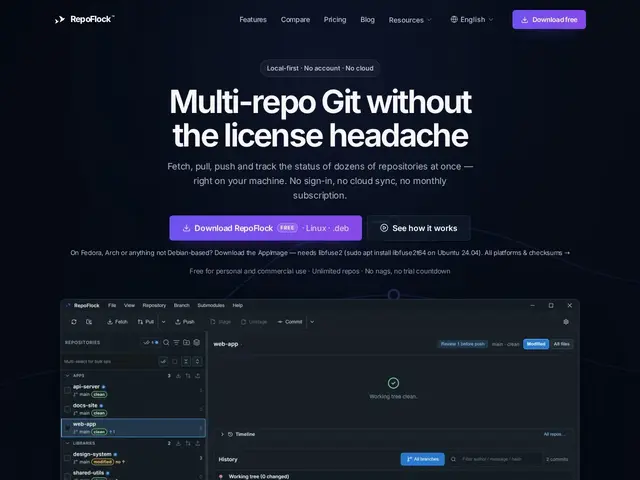
Description
Developers who work across many related codebases — say, a set of microservices or a project built from a dozen submodules — usually end up opening a terminal or a separate Git GUI window for each one, checking each repo's status one at a time. RepoFlock is built for that specific headache: it shows every repo you care about in a single table, so you can see at a glance which ones have uncommitted changes, which are ahead or behind their remote, and pull, fetch, or push across several of them at once instead of repeating the same commands over and over.
RepoFlock is a local-first desktop Git client with no required account and no cloud dependency — everything runs on your machine. Its core view is a workspace table listing branch status, ahead/behind counts, and dirty-file indicators for every tracked repo, with automatic detection and hierarchical display of Git submodules. Fetch, pull, and push operations can run in parallel across selected repos, and the app benchmarks 239ms to refresh status across 100 repositories. It includes a file preview at any Git reference without leaving the dashboard, and a cross-repo diff review step before pushing changes live. Pricing breaks from the subscription norm set by tools like GitKraken: the Free tier covers unlimited repos on unlimited machines forever, Pro is a one-time $39 payment for up to 3 machines with cross-repo branch operations and automation, and Business is $69/seat with invoicing options.
💬 Our review
The short version: RepoFlock is a genuinely useful tool if you regularly juggle a fleet of repos or submodules, and its one-time pricing is a refreshing break from subscription Git GUIs.
Compared to GitKraken, Sourcetree, Fork, and SmartGit, RepoFlock's real differentiator isn't the single-repo Git experience — those tools all handle that fine — it's the multi-repo dashboard view and parallel fetch/pull/push, which none of the mainstream clients do particularly well out of the box. The one-time $39 Pro license, versus GitKraken's ongoing per-seat subscription, is a meaningful cost advantage for anyone who keeps a tool for years. The tradeoffs: it's a young, single-purpose product without GitKraken's polish, GitHub/GitLab PR integrations, or merge-conflict visualizer, and if you only ever work in one or two repos at a time, the multi-repo dashboard adds nothing you need — a free client like Sourcetree or the plain git CLI covers that case better. For developers actually managing a fleet of interconnected repos and submodules, though, it fills a real gap the big names leave open.
💰 Pricing
📊 Global score
🤖 AI-enriched data
Free: unlimited repos, unlimited machines, forever. Pro: $39 one-time (up to 3 machines), adds cross-repo branch ops and automation. Business: $69/seat with invoice/PO options and volume discounts.
Pros
Single dashboard tracks branch status, ahead/behind, and dirty files across dozens of repos
Parallel fetch/pull/push across multiple repos at once
Automatic Git submodule detection and hierarchical organization
One-time purchase pricing instead of an ongoing subscription
Cons
No GitHub/GitLab pull-request integration mentioned
No merge-conflict visualizer described, unlike GitKraken
Young product without the polish or ecosystem of established clients
Overkill for developers who only work in one or two repos at a time