Hikaru Labs
A browser-based image toolbox for converting, compressing, resizing and watermarking photos, including a mode that compresses to an exact target file size instead of a quality slider.
🔗 Visit Hikaru Labs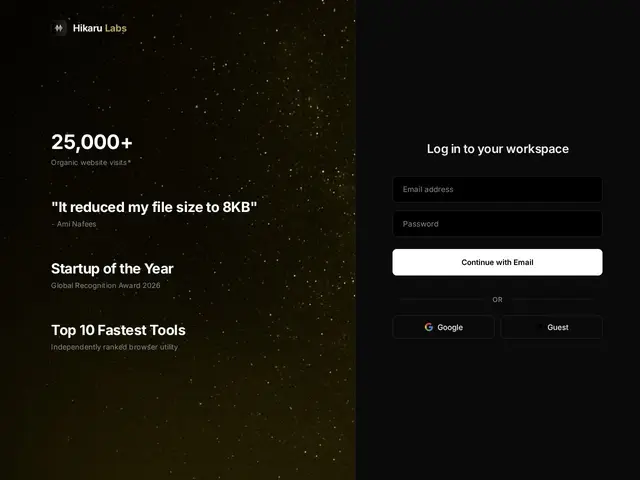
Description
Anyone who has tried to upload a photo to a form with a strict size limit — 'under 100KB', say — knows the annoying slider-and-retry dance most compression tools force on you: drag it, download, check the size, repeat. Hikaru Labs' newest feature skips that entirely: you tell it the file size you need and it works backward to hit that target directly, alongside more familiar tools for converting, resizing, batch-processing and watermarking images.
In practice, Hikaru Labs is a single-page web app that requires signing in — with email/password, a Google account, or an anonymous 'Guest' session — before any of the actual tools become reachable; the backend runs on Firebase for authentication and data, with Razorpay (an Indian payment gateway) handling paid plans. Elsewhere the product describes itself as a 'free, secure, client-side image processing engine' that keeps all processing in the browser for privacy, though the mandatory sign-in gate makes that harder to verify independently than a tool that works with zero setup. The free tier appears usable via the Guest option; paid tiers unlock higher usage limits, speed or team features for a monthly or one-time fee billed in Indian rupees.
💬 Our review
The short version: the exact-file-size compression idea is genuinely handy, but the login wall, inflated-looking marketing claims, and a pattern of repeated self-promotion make this one to try cautiously rather than trust at face value.
Compared to Google's Squoosh, which does client-side compression with zero account and a fully open-source codebase you can audit, Hikaru Labs asks you to sign in (or at least start a Guest session) before you can use anything, which undercuts its own 'private, client-side' pitch. Compared to established multi-tool suites like iLoveIMG or CloudConvert, it's much smaller and unproven, with no independent reviews and a domain that has been resubmitted to Show HN six times in two months without gaining real traction. Its actual strength — targeting an exact output file size instead of guessing with a slider — is a real, useful idea that established free tools don't offer as cleanly. But between the sign-in requirement, unverifiable pricing, and landing-page claims (traffic stats, an unnamed 'award') that read as inflated rather than sourced, it's hard to recommend paying for this yet when the free tier or a tool like Squoosh covers most of the same ground with less friction.
💰 Pricing
📊 Global score
🤖 AI-enriched data
Free 'Guest' tier available; paid tiers are billed via Razorpay in Indian rupees for higher limits/speed/team features — exact current prices unconfirmed on the live site.
Pros
Exact-file-size compression avoids trial-and-error with quality sliders
Combines convert, compress, resize, batch and watermark in one tool
Free 'Guest' access without a full account
Advertised as browser/client-side for privacy
Cons
Requires signing in (or at least a Guest session) before you can use any tool, which undercuts the 'fully local/private' pitch
Pricing not independently verifiable live; only confirmed indicative figures from a secondary deployment
On-page stats and awards ('Startup of the Year', '25,000+ visits*') are unsourced and read as marketing rather than fact
Same domain re-submitted to Show HN six times in two months with near-zero traction each time, suggesting little organic adoption yet