Pictiur
A free, browser-based tool that converts, resizes and compresses images in one pass, processing everything locally so nothing is ever uploaded.
🔗 Visit Pictiur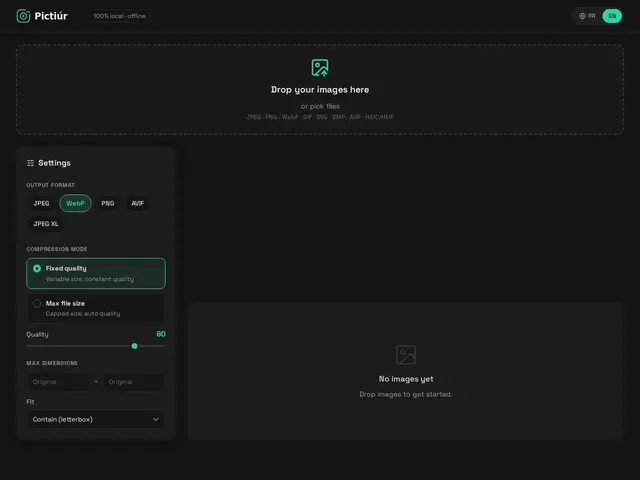
Description
Most people have hit this problem: you need to shrink a photo, change it from HEIC to something a website will accept, and make it a specific size — and end up bouncing between three different websites to do it, each one uploading your photo to a stranger's server along the way. Pictiur is built to fix that by doing all three jobs — convert, resize, compress — in a single step, and it does the work directly inside your web browser instead of sending your images anywhere. Think of it like a Swiss-army-knife photo tool that never leaves your pocket: nothing you feed it ever travels over the internet.
Technically, Pictiur is a static Progressive Web App that runs image codecs compiled to WebAssembly (mozjpeg for JPEG, oxipng for PNG) directly in the browser, and also handles WebP, AVIF, JPEG XL output and HEIC/HEIF input — a wider format list than most free online converters. Because it's a PWA, it can be installed like a native app and keeps working offline once loaded. It's also open source (MIT license) and ships a Docker image so it can be self-hosted on your own server, with optional basic-auth password protection for private deployments. It was built solo and quickly (the author credits an AI coding assistant for helping architect it), and is still a very young, actively-committed project rather than a polished product.
💬 Our review
The short version: a genuinely useful, privacy-respecting idea — one free tool instead of three — but it's a brand-new, unproven solo project rather than a mature product yet.
Compared to Google's Squoosh, the de facto standard for free, client-side image compression, Pictiur covers similar ground (WebAssembly codecs, no upload) but adds automatic resizing and conversion in the same pass, plus the option to self-host via Docker, which Squoosh doesn't offer. Compared to CloudConvert, which supports far more file types and offers a proper API for automation, Pictiur is narrower and purely manual, with no batch queue or scripting. The format list (AVIF, JPEG XL, HEIC input) is genuinely ahead of most free converters, but with zero GitHub stars, a single unnamed contributor, and only 2 points on its own Show HN launch, there's no track record yet to judge reliability or long-term support. For a quick one-off conversion it costs nothing to try; for anything you depend on regularly, Squoosh or TinyPNG currently offer more proven ground.
💰 Pricing
📊 Global score
🤖 AI-enriched data
Free and open source (MIT license); hosted as a free static site, or self-host via the published Docker image at no cost.
Pros
Free and fully open source (MIT)
100% client-side (WebAssembly) — no image ever uploaded, works offline as an installable PWA
Combines convert + resize + compress in one pass instead of three separate tools
Wide format support including AVIF, JPEG XL and HEIC/HEIF input
Self-hostable via Docker with optional password protection
Cons
Very new project with 0 GitHub stars and no independent reviews yet
Solo-developer project — long-term maintenance is unclear
No documented batch-processing or history features
UI/UX could not be independently verified (site did not render for automated review)