Cushion
Open-source, local-first markdown notes app with a built-in AI chat sidebar, made for people tired of switching between a note-taking app and an AI coding tool.
🔗 Visit Cushion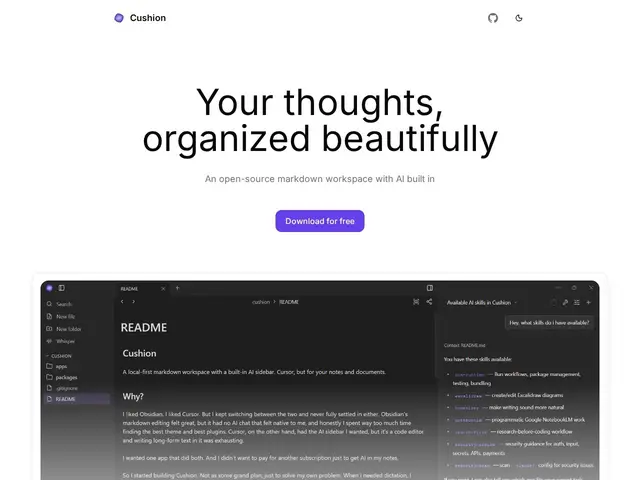
Description
Plenty of people already do a version of this manually: write notes in one app, then paste chunks into an AI chatbot in a different tab when they need help thinking something through. Cushion's whole reason for existing is that its creator got tired of bouncing between Obsidian for writing and Cursor for AI, and just built one app that does markdown notes and an AI chat side panel together, so the thinking and the writing happen in the same window.
On the technical side, the markdown editor uses CodeMirror 6 in a WYSIWYG mode that hides the raw syntax while you're not actively editing a line, which is meant to feel like a rich-text editor without losing plain markdown files underneath. The AI sidebar runs on OpenCode, so it supports skills, MCP servers, and multiple auto-discovered models rather than being locked to one vendor. It also bundles local, fully on-device speech-to-text via Sherpa ONNX (no cloud API call needed for dictation), plus support for Excalidraw drawings, PDF viewing, and KaTeX math rendering. It's fully open source, tested on Windows and Linux, with macOS builds available but not yet fully verified, and it's still early / beta-stage software with breaking changes to expect.
💬 Our review
The short version: Cushion is a genuinely clever idea — merge your notes app and your AI sidebar into one local-first tool — and being free and open source makes it low-risk to try, but it's a solo/small early-stage project with rough edges, not a finished Obsidian or Notion replacement yet.
💰 Pricing
📊 Global score
🤖 AI-enriched data
Completely free and open source; AI features work through the user's own OpenCode/model integration rather than a paid subscription tier.
Pros
Merges markdown note-taking and an AI chat sidebar in one local-first app
Completely free and open source, no subscription required
On-device speech-to-text (Sherpa ONNX) needs no cloud API
Rich extras: Excalidraw drawings, PDF viewer, KaTeX math
AI sidebar via OpenCode supports multiple models rather than one vendor lock-in
Cons
Early/beta stage with acknowledged rough edges and breaking changes expected
macOS support exists but is untested; only Windows and Linux are verified
Small, largely solo open-source project with a much smaller ecosystem than Obsidian
AI capability depends on the user correctly setting up OpenCode/models themselves
English-only interface at this stage