CC Switch
A free desktop app that centralizes configuration for multiple AI coding tools (Claude Code, Codex, Gemini CLI, and more) in one place.
🔗 Visit CC Switch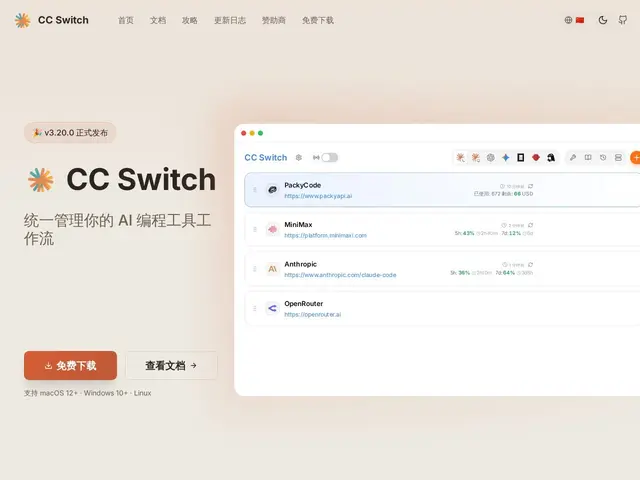
Description
If you've started juggling more than one AI coding assistant — say Claude Code for one project and Codex or Gemini CLI for another — you already know the annoyance of re-entering API keys and settings every time you switch. CC Switch is a small desktop app that exists to solve exactly that: one place to store and swap between the configurations for all your AI coding tools.
CC Switch is a cross-platform desktop app (built with Tauri and React) that centralizes configuration management for eight or more AI coding tools — Claude Code, Claude Desktop, Codex, Gemini CLI, Grok Build, and others — with over 50 built-in provider presets. It offers a visual config UI, unified MCP and Skills management, a system-tray quick-switcher, cloud sync (Dropbox, OneDrive, iCloud, WebDAV), and a local proxy with hot-switching, failover, and cost/usage tracking across tools. It's open source and free, aimed squarely at developers who've accumulated multiple AI coding assistants and want one control panel instead of five separate config files.
💬 Our review
The short version: CC Switch is a free, open-source control panel for anyone running more than one AI coding assistant, replacing scattered config files and re-typed API keys with one visual switcher and synced settings across devices.
It's a narrow, practical tool — the value is entirely in how much configuration friction it removes if you actually use multiple AI coding tools day to day, and the usage/cost tracking across tools is a genuinely useful bonus most people don't build for themselves.
The obvious limit: if you only use one AI coding assistant, there's nothing here for you — it's solving a problem you don't have. It's also scoped to a fixed list of supported tools rather than being fully general. For developers actively switching between Claude Code, Codex, and similar tools, it removes real daily friction for free.
💰 Pricing
📊 Global score
🤖 AI-enriched data
Gratuit et open source, application de bureau (Tauri).
Pros
Un seul endroit pour 8+ outils IA et 50+ presets fournisseurs
Synchronisation cloud multi-appareils
Suivi d'usage et de coût unifié
Bascule rapide depuis la barre système
Cons
Utile seulement si vous utilisez plusieurs outils IA en parallèle
Liste d'outils supportés fixe, pas totalement générique
Nécessite le runtime Tauri