Write.md
Write.md is a free, open-source Markdown editor for macOS that lets you customize the look of your writing environment and save it as a reusable profile.
🔗 Visit Write.md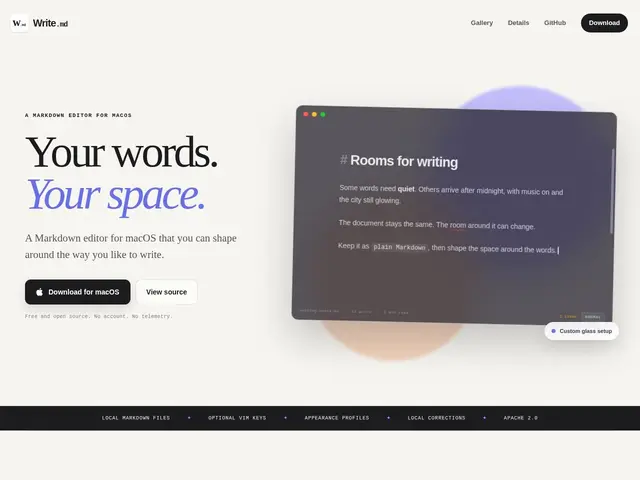
Description
Most Markdown editors give you one look, maybe a light and dark mode, and that's it. Write.md takes the opposite approach: you can change the typography, colors, background, and overall feel of the editor to match whatever headspace you're writing in — a distraction-free dark mode for late-night drafting, a warm paper-like look for editing, whatever fits — and save each setup as a profile you can switch between instantly. It works entirely with plain Markdown files on your own disk, so there's no account to create and nothing gets uploaded anywhere.
It's free and open source, with the code published on GitHub, and it's currently built specifically for Apple silicon Macs, so it won't run on Intel Macs or other platforms. Beyond appearance customization, it supports optional Vim key bindings for people who prefer modal editing, and includes built-in spelling and style corrections. Because it only touches local files and collects no data, it fits naturally into a workflow where you already keep notes or drafts as plain Markdown — in Obsidian, a git repo, or just a folder — and want a nicer, more personal-feeling editor on top of them without any lock-in.
💬 Our review
The short version: if you're on an Apple silicon Mac, already write in Markdown, and care about the writing environment actually looking and feeling the way you want, Write.md is worth trying since it costs nothing and doesn't ask for an account or your data. The appearance-profile idea — different visual setups for different writing contexts — is a small but genuinely useful touch most editors don't bother with.
The real limitations are platform and ambition: it's Apple-silicon-only, so Intel Mac, Windows, and Linux users are out entirely, and it's a focused, local-file editor rather than a full writing suite — no sync, no publishing pipeline, no collaboration features like you'd get from something like Typora (which is cross-platform and similarly minimal) or iA Writer (which adds a polished cross-device sync and publishing story for a one-time fee). If all you need is a nice-looking local Markdown editor on a Mac, it's hard to beat at $0; if you need cross-platform sync, look elsewhere.
💰 Pricing
📊 Global score
🤖 AI-enriched data
Gratuit et open-source (code sur GitHub), aucun palier payant. Limité aux Mac Apple silicon.
Pros
Gratuit et open-source, code public sur GitHub
Profils d'apparence personnalisables et réutilisables
Fonctionne uniquement en local, aucune donnée envoyée
Bindings Vim optionnels, corrections orthographiques intégrées
Cons
Limité aux Mac Apple silicon — pas d'Intel, Windows ou Linux
Pas de synchronisation cross-device ni de pipeline de publication
Outil minimaliste, pas une suite d'écriture complète