WhimFiles
WhimFiles is a macOS file manager that helps you find files fast by filtering folders live by type, date, and size, instead of opening a dozen Finder windows.
🔗 Visit WhimFiles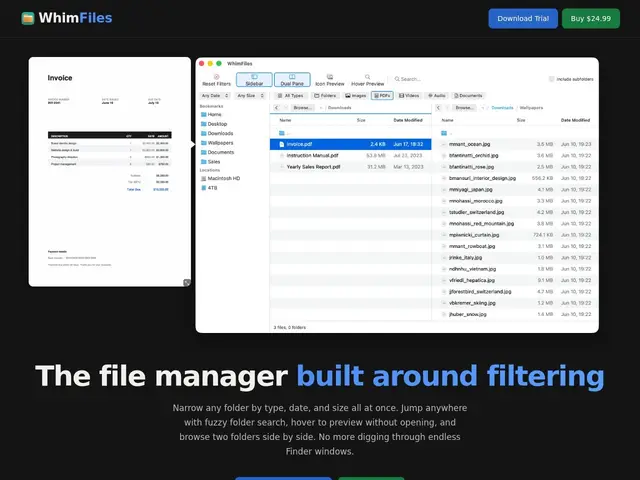
Description
If you've ever dug through a downloads folder or a project directory trying to find "that one file from last month that's bigger than a few megabytes," you know Finder isn't really built for that kind of question. WhimFiles is built specifically around solving it: as you narrow a folder down by type, date, and size at the same time, the results update instantly, so you find what you're looking for by filtering rather than scrolling and guessing.
Beyond filtering, it adds a fuzzy "Go to Folder/File" search for jumping around quickly, hover previews for images and PDFs so you don't have to open files just to check them, and dual-pane browsing so you can view and move files between two locations side by side instead of juggling multiple Finder windows. It also includes a tabbed interface with persistent layouts, batch rename, image format conversion (HEIC/WebP/AVIF to JPG/PNG), a keyboard-driven command palette, and a sidebar with bookmarks and volume management. It's a one-time purchase of $24.99 with a 30-day free trial and no credit card required to start, and that price includes all future updates rather than a subscription.
💬 Our review
The short version: for anyone who manages a lot of files on macOS — photographers, developers, creatives with big asset libraries — WhimFiles' live multi-criteria filtering and dual-pane browsing genuinely speed up the parts of file management that Finder makes tedious, and a $24.99 one-time price with all future updates included is a fair, low-risk ask compared to a subscription.
The honest limitation is that it's a Finder replacement/supplement, not a full file-sync or cloud-storage tool — it doesn't back up or sync your files anywhere, it just helps you navigate and organize what's already on disk. Compared to Finder itself (free, obviously, but weaker filtering) or Path Finder (a more established, feature-dense Finder alternative with a similar one-time-or-subscription pricing model), WhimFiles' pitch is narrower and more focused specifically on fast filtering rather than being an all-in-one Finder replacement — which is either an advantage (less bloat) or a limitation (fewer total features) depending on what you need.
💰 Pricing
📊 Global score
🤖 AI-enriched data
24,99$ en achat unique, essai gratuit de 30 jours sans carte bancaire, mises à jour futures incluses
Pros
Filtrage en temps réel par type, date et taille simultanément
Navigation double panneau et recherche floue rapide
Aperçus au survol pour images et PDF
Achat unique incluant les mises à jour futures, pas d'abonnement
Cons
Ne remplace pas un outil de sauvegarde ou de synchronisation cloud
Périmètre plus étroit que des alternatives Finder plus complètes comme Path Finder
macOS uniquement