Line9
Line9 is a drop-in rendering engine for Mermaid diagrams that produces cleaner, presentation-ready charts without changing any syntax.
🔗 Visit Line9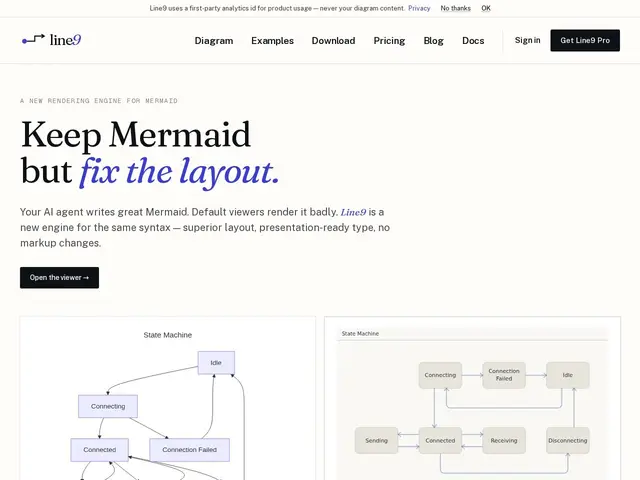
Description
If you've ever pasted a Mermaid flowchart into a doc and cringed at the cramped boxes and ugly line crossings, Line9 fixes that without asking you to relearn anything. You keep writing the exact same Mermaid text you already know, but instead of letting Mermaid's default renderer draw it, Line9 takes over the drawing step and produces a version that looks like it came out of a design tool — better spacing, cleaner typography, fewer overlapping arrows. Nothing about your source diagram changes, only how it looks on screen or in an exported image.
Technically, Line9 keeps Mermaid's existing parser intact and replaces only the layout/rendering pipeline, which is why it's compatible with diagrams you've already written. It ships as both a web viewer (paste-and-render, or share via URL hash) and a CLI for local, client-side rendering with SVG and PNG export. The free tier covers personal use with a watermark; the Pro tier ($10-12/seat/month) removes the watermark, unlocks a commercial-use license, private workspaces, and published diagram sharing for teams that want to embed clean diagrams in docs, decks, or product UIs. It also offers AI-powered diagram generation for going from a text description straight to a rendered chart.
💬 Our review
The short version: if Mermaid diagrams are part of your documentation or product and you're tired of the default renderer's cramped, awkward layouts, Line9 is a low-friction upgrade — you don't rewrite anything, you just get a better-looking result. The free tier is enough to try it seriously since it uses your existing Mermaid syntax; the watermark is the only real limitation until you pay.
The honest caveat is that Line9 solves a narrow, specific problem — Mermaid rendering quality — rather than being a general diagramming tool like Excalidraw, tldraw, or Lucidchart, which let you draw freeform and don't require learning Mermaid's text syntax at all. If your team already writes Mermaid in READMEs, Notion, or GitHub, Line9 is close to free lunch: same input, nicer output. If you don't already use Mermaid, adopting it just to use Line9 is probably not worth the learning curve compared to a WYSIWYG diagram tool that's easier for non-technical collaborators to touch.
💰 Pricing
📊 Global score
🤖 AI-enriched data
Gratuit : usage personnel, viewer web + CLI, avec filigrane. Pro : 10-12$/siège/mois (facturation annuelle ou mensuelle) — licence commerciale CLI, suppression du filigrane, espaces privés, partage de diagrammes publiés.
Pros
Compatible avec la syntaxe Mermaid existante — zéro migration
Rendu nettement plus soigné (espacement, typographie) que le moteur Mermaid par défaut
CLI de rendu côté client pour intégration dans des pipelines de documentation
Génération de diagrammes assistée par IA à partir d'une description texte
Cons
Résout un problème étroit (le rendu Mermaid) plutôt qu'un besoin de diagramming général
Filigrane sur le tier gratuit, sans usage commercial
Nécessite déjà d'utiliser Mermaid — peu d'intérêt sinon