DevCleaner
A macOS menu bar app that finds and clears out the gigabytes of leftover build caches, node_modules folders and Docker images that pile up across your dev tools, without you having to hunt them down manually.
🔗 Visit DevCleaner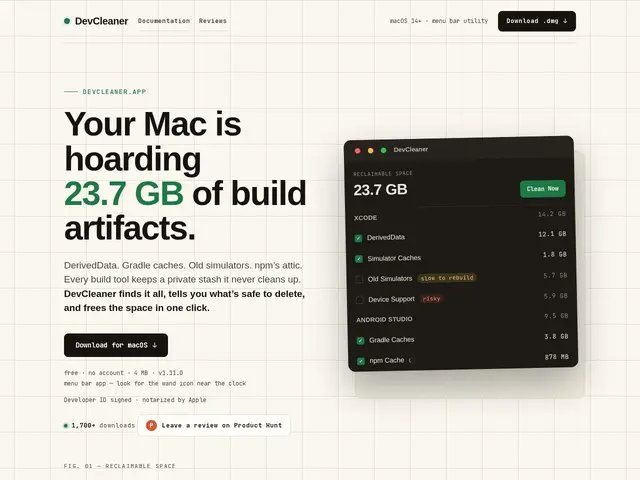
Description
If you code on a Mac, your disk is quietly filling up with junk you never asked for: old Xcode build caches, forgotten node_modules folders, Docker images from projects you finished months ago. Each dev tool cleans up after itself badly, and finding all of it by hand across a dozen tools is tedious enough that most people just... don't, until they get a "disk almost full" warning. DevCleaner is a small menu bar app that scans for this kind of build waste across your whole machine and lets you clear it in a couple of clicks.
DevCleaner supports 23+ developer ecosystems out of the box — Xcode derived data, Android Studio caches, npm/yarn/pnpm artifacts, Docker images and containers, Ollama model caches, and more — and includes a "Ghost Projects" feature that finds build artifacts left behind by projects you've since deleted or moved. The free tier covers scanning, one-click Quick Clean, Ghost Projects discovery, and project restoration if you clean something you needed. The $29 lifetime (or $19.99/year) Pro tier adds Auto Clean on a schedule, Smart Triggers (clean automatically under configurable conditions, like low disk space), Project Hibernation, and batch archiving for larger teams managing many repos.
💬 Our review
The short version: if you're a Mac-based developer who's tired of manually running `docker system prune` or hunting down stray node_modules folders, DevCleaner automates that cleanup with a proper GUI and a free tier that's actually useful on its own.
The honest comparison is against doing it yourself for free: `npkill` (npm-specific, CLI, free) and `docker system prune` (native, free) already cover two of DevCleaner's 23+ ecosystems at zero cost, and a general cleaner like CleanMyMac X covers broader system junk but has weaker, less dev-specific detection for things like Xcode derived data or Ollama caches. DevCleaner's real value is breadth (23+ ecosystems in one place) and safety features like Ghost Projects and restoration, which the manual CLI route doesn't give you. At $29 lifetime, it's a low-risk buy if you regularly juggle multiple dev environments and don't want to remember five different cleanup commands; if you only ever touch npm and Docker, the free native tools do the job and Pro's automation features (Smart Triggers, scheduled Auto Clean) won't add much.
💰 Pricing
📊 Global score
🤖 AI-enriched data
Gratuit (scan, Quick Clean, Ghost Projects, restauration) ; Pro 29 $ à vie ou 19,99 $/an (Auto Clean programmé, Smart Triggers, Project Hibernation, archivage par lot) ; essai Pro 14 jours
Pros
Couvre 23+ écosystèmes de dev en un seul outil (Xcode, Docker, npm, Android Studio, Ollama…)
Fonction "Ghost Projects" pour retrouver les résidus de projets supprimés
Restauration possible si un nettoyage était une erreur
Niveau gratuit déjà utile sans payer
Cons
macOS uniquement, aucune version Windows/Linux
Plusieurs de ses fonctions gratuites existent en CLI gratuite pour qui code déjà (npkill, docker prune)
Automatisation avancée (Smart Triggers, Auto Clean) réservée au Pro payant
Utilité limitée si vous ne travaillez que sur un ou deux écosystèmes