Dayflow
A free, open-source Mac app that quietly screenshots your activity and uses AI to turn it into a readable timeline of your workday — no manual tagging.
🔗 Visit Dayflow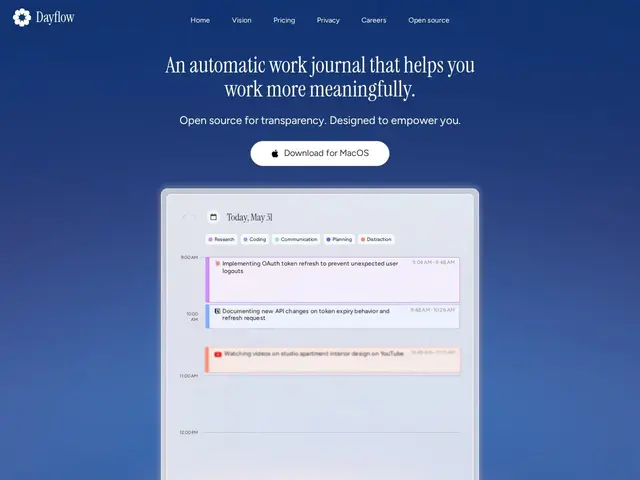
Description
Dayflow answers a question a lot of remote workers ask themselves at 6pm: 'what did I actually do today?' It quietly takes a screenshot of your Mac screen once a second in the background, then uses AI to turn those screenshots into a readable timeline — 'researched pricing strategy on YouTube' instead of a blank memory — without you tagging or categorizing anything by hand.
It's open source and privacy-first by design: in local mode it runs entirely offline using Ollama or LM Studio, so nothing leaves your machine, or you can point it at Gemini's free tier or your existing ChatGPT/Claude subscription for cloud-based analysis. It's free with an MIT license, backed by Y Combinator, and already used internally at companies like Meta, Google, DoorDash, and Square.
💬 Our review
The short version: Dayflow is a legitimately good idea executed well — an automatic work journal that writes itself, with a genuine free, private, local-only mode that most 'AI activity tracker' competitors don't offer.
Against paid, cloud-only time trackers like RescueTime or Timely, Dayflow's local-first, open-source model is the real differentiator: your screen activity data can stay entirely on your Mac if you use Ollama or LM Studio instead of a cloud AI, which matters for anyone in a regulated field or just uncomfortable sending screenshots to a third party. The tradeoff is setup friction — local AI models need to be installed and run on reasonably fast hardware to keep up with real-time analysis, whereas cloud competitors work out of the box. Since it's free and open source with no subscription to evaluate, there's essentially no financial risk in trying it, only the time cost of setup. <!-- ai-generated -->
💰 Pricing
📊 Global score
🤖 AI-enriched data
Gratuit et open source (licence MIT) ; mode IA local illimité ; mode cloud optionnel via Gemini gratuit ou abonnement ChatGPT/Claude existant
Pros
100% gratuit et open source
Mode local sans envoi de données
Résumés IA automatiques sans tag manuel
Cons
Mac uniquement
Mode local exigeant en ressources machine