LinkVault
A freelancer sends the client a link to preview the finished work — but the actual file only unlocks after the client pays, so 'send me the file and I'll pay you later' stops being an option.
🔗 Visit LinkVault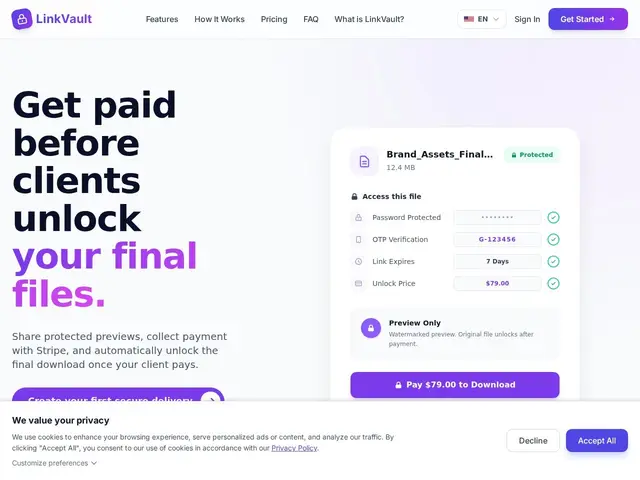
Description
Every freelancer eventually runs into the client who takes the delivered file and quietly stops answering messages about payment. LinkVault is built around removing that risk entirely: you upload the finished file, set a price, and share a protected link. The client sees a secure preview of the work, but the real, downloadable file only unlocks automatically once they pay through Stripe — there's no manual step where you have to trust them or chase an invoice afterward.
Beyond the pay-to-unlock mechanic, it adds password protection, link expiration, view tracking so you can see whether the client actually opened it, and AES-256 encryption on stored files. Pricing scales with usage: a free pay-as-you-go option (5% + $0.50 per unlock), then Starter at $12/month (2GB), Professional at $29/month (20GB, unlimited links), and Business at $79/month (100GB, custom branding and domain).
💬 Our review
The short version: if you've ever delivered work and then had to chase a client for payment, LinkVault's pay-to-unlock model removes that awkward conversation entirely by making payment a technical requirement, not a request.
Compared to just emailing the file and invoicing separately (free, but relies entirely on the client's goodwill) or general file-sharing tools like Dropbox or WeTransfer that have no payment gate at all, LinkVault's structural advantage is that the two steps — delivery and payment — are fused into one, so there's no gap where a client can walk away with the work unpaid. The tradeoff is the free tier's 5%+$0.50 per-unlock fee adds up faster than a flat monthly plan for anyone delivering frequently, and it's a narrower tool than general cloud storage — it's built specifically for the pay-then-download moment, not ongoing file collaboration. For freelancers and small agencies who've been burned by non-payment even once, it's a cheap insurance policy.
💰 Pricing
📊 Global score
🤖 AI-enriched data
Gratuit : 5% + $0.50 par déblocage (min $2) ; Starter $12/mois (2 Go) ; Professional $29/mois (20 Go, liens illimités) ; Business $79/mois (100 Go, image de marque personnalisée)
Pros
Le fichier ne se débloque qu'après paiement Stripe confirmé
Aperçu protégé/filigrané avant paiement
Chiffrement AES-256 et expiration de lien
Suivi des vues pour savoir si le client a ouvert le lien
Cons
Frais de 5%+$0.50 par déblocage sur le palier gratuit, coûteux à haut volume
Outil étroit : pensé pour la livraison ponctuelle, pas la collaboration continue
Dépendance à Stripe
Palier Business à $79/mois pour les fonctions de marque personnalisée