Speechius
A teleprompter that scrolls itself by listening to what you're actually saying, and stays invisible even when you're screen-sharing on Zoom or recording a demo.
🔗 Visit Speechius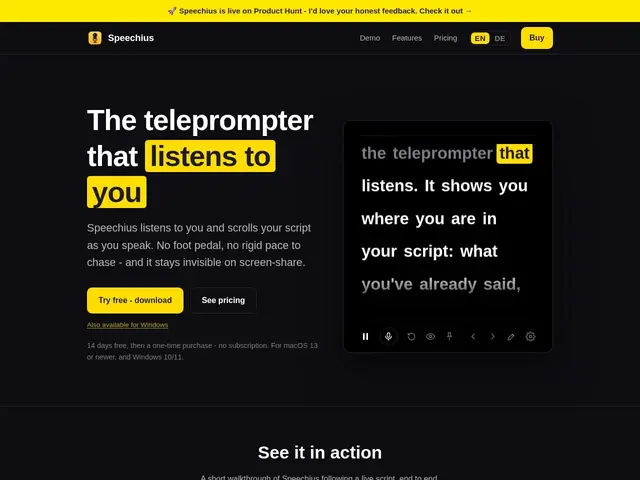
Description
Regular teleprompters either scroll on a fixed timer that doesn't match your actual speaking pace, or require someone else to control the scroll manually. Speechius listens to your voice via on-device speech recognition and moves the script forward in sync with what you've actually just said — and because it can hide itself from screen recording and screen-share tools, your audience never sees it.
Speechius is a desktop app (macOS 13+ and Windows 10/11) built for webinars, online talks and screen-shared demos, with an "undetectable" mode that keeps it hidden specifically from Zoom, Google Meet, Microsoft Teams and OBS capture. All speech recognition runs on-device — no data uploaded, no account required — and it supports slide-advance triggers, an always-on-top adjustable-transparency window, click-to-navigate positioning and an adjustable reading line. Recognition and UI currently support English and German. It's priced as one-time purchases: EUR 30 for Pro or EUR 60 for Studio (founding prices for the first 100 buyers, rising to EUR 50/100 after), both including 12 months of updates, with a 14-day free trial and no subscription.
💬 Our review
The short version: if you regularly present on video calls or record screen-shared demos and want your script visible only to you, Speechius's voice-synced, screen-share-invisible teleprompter is a cheap one-time buy that solves a genuinely specific problem.
Most teleprompter software either uses foot pedals or fixed-speed scrolling and doesn't specifically defeat screen-share detection — Speechius's voice-driven scrolling plus its undetectable mode targeting Zoom/Meet/Teams/OBS specifically is the differentiator that matters for anyone whose audience is watching a screen share. At EUR 30-60 one-time with a 14-day trial, it's low-risk to test, though language support is currently limited to English and German, which rules it out for presenters in other languages. Good fit for webinar hosts, course creators and anyone doing recorded screen-share demos who scripts their talks; unnecessary if you present without a script or already use a physical teleprompter setup.
💰 Pricing
📊 Global score
🤖 AI-enriched data
Pro €30 (prix de lancement, puis €50) · Studio €60 (prix de lancement, puis €100) — essai gratuit 14 jours, 12 mois de mises à jour inclus
Pros
Défilement synchronisé à la voix, pas à une vitesse fixe
Mode invisible spécifiquement pensé pour Zoom/Meet/Teams/OBS
100% traitement local, aucune donnée envoyée, pas de compte requis
Prix unique bas avec essai gratuit 14 jours
Cons
Reconnaissance vocale limitée à l'anglais et l'allemand
Inutile si vous présentez sans script
Marché de niche, peu d'alternatives directes pour comparer
Prix de lancement temporaire, doublera après les 100 premiers acheteurs