Cainban
A task board that lives entirely in your terminal instead of a browser tab — for developers who'd rather type a quick command to move a task to 'done' than click through a web app, and who want their AI coding assistant to be able to manage the same board
🔗 Visit Cainban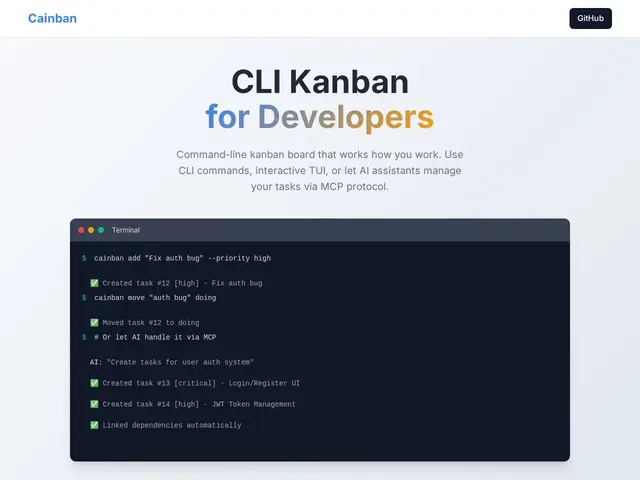
Description
Most kanban boards (Trello, Asana, Jira) assume you're working in a browser, which means alt-tabbing out of your terminal every time you want to check or update a task — a small friction that adds up for developers who live in the command line all day. Cainban skips the browser entirely: it's a command-line tool with an interactive terminal interface (TUI) for managing boards, so task tracking stays in the same window as your code.
Beyond the CLI and TUI, it includes a Model Context Protocol (MCP) server, which means AI coding assistants can read and update your task board directly through natural language rather than you manually syncing what the AI just did with your tracker. It supports task prioritization (none through critical), fuzzy search, task linking and dependencies, and multiple boards, all backed by a local SQLite database. It's free and open source under the MIT license, with no paid tiers at all.
💬 Our review
The short version: Cainban is a good fit for developers who already resent switching to a browser tab for task management and who are increasingly working alongside AI coding agents that could just as easily update the board themselves via MCP — it's a narrow tool solving a specific friction, not a general project-management platform.
Against Trello, Asana, or Jira, Cainban deliberately gives up team collaboration features, web access from any device, and third-party integrations in exchange for staying entirely local and terminal-native — a fair trade if you're a solo developer or small technical team, a bad one if you need to coordinate with non-technical teammates who won't touch a CLI. The MCP server is the most forward-looking piece here: as AI coding agents become normal collaborators in a codebase, having your task board natively speak their protocol (rather than requiring a human to translate) is a genuinely useful bit of future-proofing. Being fully free and open source (MIT) removes any cost risk, though as with most single-purpose open-source CLI tools, you should expect less polish and support than a funded SaaS product. <!-- ai-generated -->
💰 Pricing
📊 Global score
🤖 AI-enriched data
Licence MIT, aucune offre payante
Pros
Reste entièrement dans le terminal, pas de va-et-vient vers un navigateur
Serveur MCP intégré : les assistants IA peuvent mettre à jour le tableau directement
Gratuit et open source (MIT), aucun risque de coût
Priorisation, recherche floue, liens de dépendance entre tâches inclus
Cons
Pas de collaboration d'équipe web comme Trello/Asana/Jira
Inutilisable pour des coéquipiers non-techniques réticents au CLI
Moins de polish/support qu'un produit SaaS financé
Pas d'information sur la taille de la communauté ou l'adoption réelle