Argus - Worktree Agent Session Manager
Organizes multiple Git worktrees and AI coding agent sessions (Claude Code, Codex) inside VS Code, so juggling several parallel branches doesn't turn into a mess of unlabeled terminal tabs.
🔗 Visit Argus - Worktree Agent Session Manager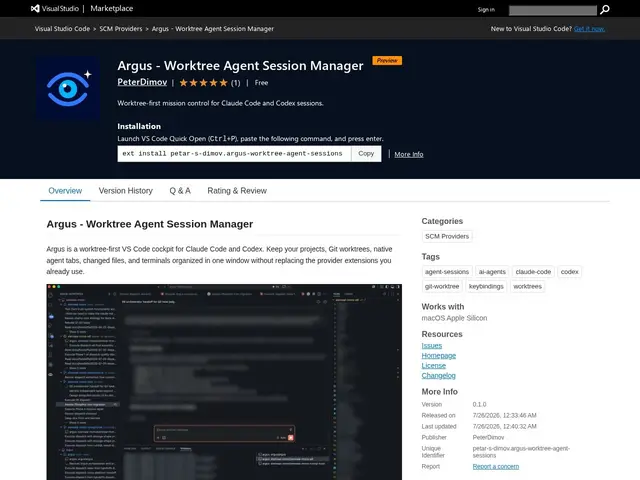
Description
Running an AI coding agent on several Git worktrees at once — one branch for a feature, another for a bugfix, a third for review — quickly turns into a pile of terminal tabs with no clear labeling of which is which. Argus is a VS Code extension that organizes Git worktrees, AI agent sessions, and dev tools into one unified interface, so you always know which agent session belongs to which worktree.
It discovers existing Git worktrees automatically, lets you launch Claude Code or Codex sessions scoped to a specific worktree, manages native agent tabs, and groups terminals by worktree so related work stays visually together. It shows changed files for each active worktree and observes provider session state. Usage is straightforward: install via the VS Code Activity Bar, add a Git repository, let Argus discover existing worktrees, and create new sessions or terminals tied to a specific worktree from there. It's explicitly an organizational layer rather than a replacement for Claude Code or Codex's native functionality — the agents still do the actual work, Argus just gives you a worktree-aware control panel for managing many of them at once. It requires macOS on Apple Silicon, VS Code 1.125.0+, Git, and Claude Code 2.1.206+ or a compatible Codex extension, and is free under the MIT license.
💬 Our review
The short version: if you run multiple AI coding agent sessions across different Git worktrees and constantly lose track of which terminal belongs to which branch, Argus's worktree-scoped organization is a small but genuinely useful fix for a workflow problem that's become common as agent-assisted development scales up.
It doesn't try to replace Claude Code or Codex — it's a thin, honest organizational layer on top of them, which is the right scope for a young extension (0.1.0 preview, one 5-star review) rather than overreaching into agent orchestration it can't yet back up. The macOS-on-Apple-Silicon-only requirement is a real limitation that rules it out immediately for Windows or Linux developers, and being VS Code-specific means it won't help if you work in a different editor. For a Mac-based developer already juggling several worktrees with Claude Code or Codex, it costs nothing to try and directly targets a specific, real annoyance; for anyone outside that narrow platform requirement, there's currently no equivalent to fall back on beyond manually labeling terminal tabs yourself.
💰 Pricing
📊 Global score
🤖 AI-enriched data
Gratuit, licence MIT
Pros
Regroupe sessions d'agents et terminaux par worktree
Découverte automatique des worktrees Git existants
Affiche les fichiers modifiés par worktree actif
Reste une couche d'organisation, ne remplace pas Claude Code/Codex
Gratuit, licence MIT
Cons
Limité à macOS sur Apple Silicon uniquement
Spécifique à VS Code, inutilisable sur un autre éditeur
Extension très jeune (version 0.1.0 preview, un seul avis)