boringBar
A macOS taskbar that shows your windows organized by desktop, with previews and a built-in app launcher.
🔗 Visit boringBar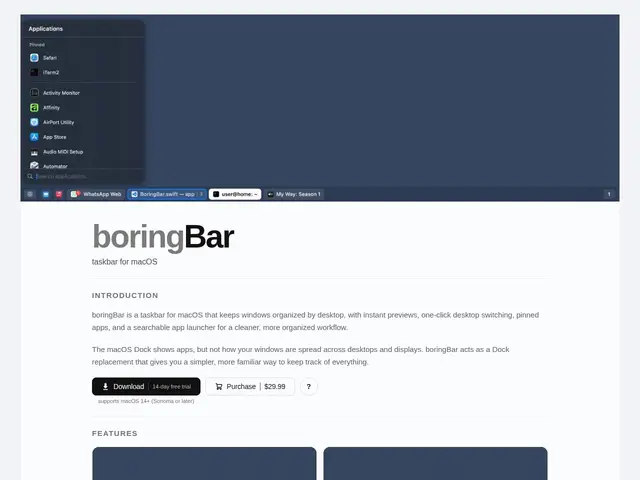
Description
macOS hides a real weakness once you start using multiple desktops: the Dock has no idea which windows live on which desktop, so switching between them means guessing or hunting through Mission Control. boringBar fixes this by putting a real taskbar at the top of your screen that always shows exactly which windows are open on your current desktop, with a thumbnail preview when you hover over any of them.
boringBar is a native macOS menu bar utility that groups open windows by desktop and display, shows a window count per desktop, and lets you switch desktops or jump to a specific window with one click. It also bundles a searchable application launcher, notification badges, and an "attention pulse" alert for windows that need your input. It requires macOS 14 (Sonoma) or later plus Accessibility and Screen Recording permissions to read window state, and supports multiple displays.
💬 Our review
The short version: if you regularly juggle multiple macOS desktops and the built-in Dock/Mission Control combo has started to feel clunky, boringBar is a well-built $29.99-or-so fix — but if you only ever use one desktop, you won't get much out of it.
Against the built-in macOS window switcher (Cmd+Tab and Mission Control), boringBar's value is entirely about visibility: seeing window counts and thumbnails per desktop before you switch, rather than blindly cycling through them. Compared to alternatives like Contexts or HyperSwitch, which focus more narrowly on window switching, boringBar bundles in an app launcher and desktop-aware previews for a similar one-time-or-yearly price point. The permissions requirement (Accessibility + Screen Recording) is worth knowing upfront since some users are wary of granting screen-recording access to a third-party menu bar app, even for legitimate window-preview purposes.
💰 Pricing
📊 Global score
🤖 AI-enriched data
Perpétuel $29.99 (2 appareils) ou annuel dès $7.99/an ; essai gratuit 14 jours
Pros
Fenêtres groupées par bureau avec aperçus miniatures
Lanceur d'applications intégré
Support multi-écrans
Essai gratuit 14 jours
Cons
Nécessite permissions Accessibilité + Enregistrement d'écran
macOS 14+ requis
Peu d'intérêt si un seul bureau est utilisé