AionUi
A free desktop app where an AI agent works alongside you on your own computer — reading files, browsing the web, writing documents, even making PowerPoint slides — instead of just chatting with you in a text box.
🔗 Visit AionUi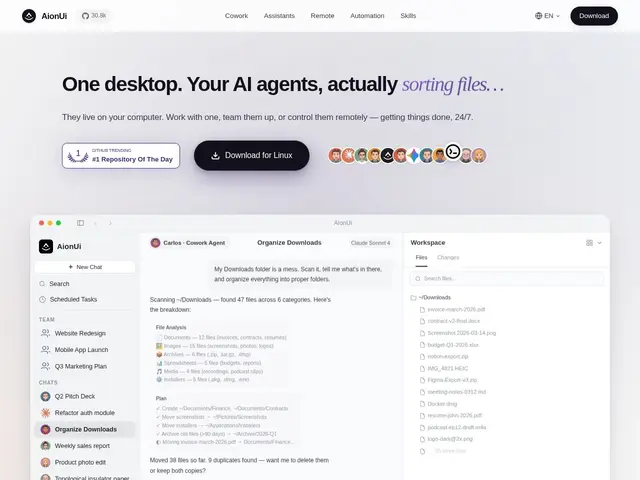
Description
Most AI chat apps are limited to a conversation window: you ask, it answers, and any real work (editing a file, searching the web, building a spreadsheet) is still on you to do by hand. AionUi is built to close that gap on the desktop, giving an AI agent enough access to actually complete multi-step tasks on your machine rather than just describing how to do them.
AionUi is a free, open-source (Apache 2.0, 30,900+ GitHub stars) desktop 'Cowork' application supporting multiple AI agent backends (Claude Code, Codex, Hermes Agent, OpenClaw and others) rather than locking you to one model. It requires zero CLI installation, includes 21 built-in professional assistants (PowerPoint creation, Word/Excel generation, academic paper writing and more), a team mode for running multiple agents in parallel, cross-platform support with remote WebUI access, integrations with chat platforms (Telegram, Lark, DingTalk, WeChat), document preview for 10+ formats, and cron-based scheduled task automation. It's entirely free — you only pay your chosen AI provider for the API calls the agent makes.
💬 Our review
The short version: AionUi gives you a genuinely free, open-source alternative to paid 'AI cowork' products, with the added flexibility of choosing which underlying AI agent (Claude Code, Codex, and others) actually does the work instead of being locked to one vendor.
The most direct comparison is Anthropic's own Claude Cowork concept — both aim for an AI agent that works alongside you on real desktop tasks rather than just chatting — but AionUi's open-source, multi-agent-backend design means it isn't tied to a single company's roadmap or pricing decisions, and it costs nothing beyond whatever API usage your chosen model provider charges. The tradeoff of that flexibility is integration polish: a single-vendor product can guarantee tighter, more predictable behavior because it controls both the app and the model, while AionUi's multi-backend approach means quality can vary depending on which agent you plug in. With 30,900+ stars and active development, it's clearly resonating, and the built-in professional assistants (PPT, Word, Excel generation) are a genuinely useful head start for common office tasks rather than needing to prompt-engineer each one from scratch.
💰 Pricing
📊 Global score
🤖 AI-enriched data
Entièrement gratuit et open-source (Apache 2.0). Seuls les appels API du fournisseur IA choisi sont facturés séparément.
Pros
Entièrement gratuit et open-source, aucun abonnement
Compatible avec plusieurs agents IA (Claude Code, Codex, Hermes, OpenClaw...)
21 assistants professionnels intégrés (PPT, Word, Excel, articles académiques)
Mode équipe : plusieurs agents en parallèle
Cons
Qualité variable selon l'agent IA branché en arrière-plan
Moins d'intégration native qu'un produit mono-fournisseur
Coûts API du fournisseur choisi restent à la charge de l'utilisateur