ide99
Free, local-first PostgreSQL IDE with a query EXPLAIN visualizer, JSONB browser, and live database health monitoring.
🔗 Visit ide99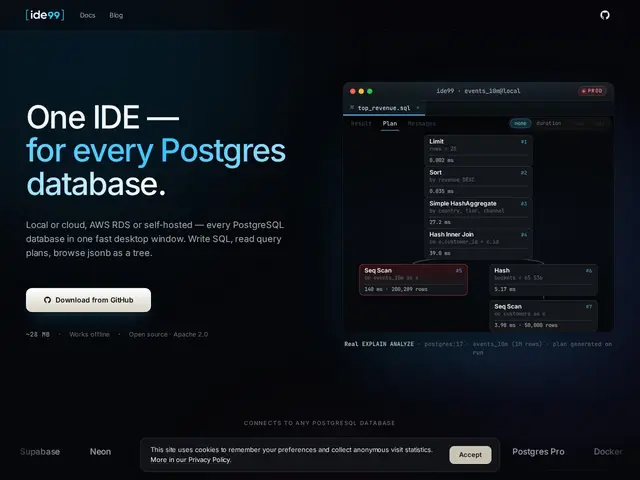
Description
Working with PostgreSQL day to day usually means juggling several separate tools: a query editor, something to read a slow query's EXPLAIN plan, a way to poke at JSON columns, and a dashboard to check if the database is healthy right now. ide99 bundles all of that into one free desktop app built specifically for Postgres, rather than being a generic multi-database client with Postgres bolted on.
ide99 is a local-first PostgreSQL IDE with native builds for macOS, Linux, and Windows. Beyond a standard SQL editor with syntax highlighting, it includes a visual EXPLAIN plan analyzer to make sense of query performance, a JSONB tree browser for inspecting nested JSON columns without manual formatting, and a 'Health screen' plus 'Live Ops' view for monitoring the database in real time. It has dedicated support for popular Postgres extensions — pgVector, PostGIS, and TimescaleDB — that generic clients often handle poorly or not at all. It's free forever and open source, positioned as a modern, lighter alternative to DBeaver, DataGrip, and pgAdmin.
💬 Our review
The short version: ide99 is what a Postgres client looks like when it's built for Postgres specifically instead of retrofitted from a multi-database tool — the EXPLAIN visualizer and extension-aware support (pgVector, PostGIS, TimescaleDB) are things DBeaver and pgAdmin handle more awkwardly as generic afterthoughts.
DataGrip has similar polish and a visual query plan tool, but it's a paid JetBrains product; ide99 offers a comparable Postgres-focused experience for free. DBeaver is free and supports many databases, but its Postgres-specific tooling (extension support, EXPLAIN readability) is generally less refined because it has to serve every database engine equally. pgAdmin is the official tool and rock-solid for basic admin, but its UI and query tooling feel dated next to ide99's. The obvious risk with a smaller, newer, single-purpose tool is community size and long-term maintenance — worth checking the GitHub activity before betting a team workflow on it, but for individual developers wanting a fast, free, Postgres-native IDE, it's a strong pick.
💰 Pricing
📊 Global score
🤖 AI-enriched data
Gratuit à vie, open source
Pros
Gratuit à vie, natif macOS/Linux/Windows
Visualiseur EXPLAIN dédié Postgres
Support natif pgVector, PostGIS, TimescaleDB
Health screen et Live Ops pour monitoring temps réel
Cons
Postgres uniquement, pas de multi-bases comme DBeaver
Outil plus jeune, communauté plus petite
Moins de fonctionnalités périphériques que DataGrip (payant)