IMGVID.ai
Turns a single photo into a short AI video — add a motion prompt, pick a model, get a clip in about a minute.
🔗 Visit IMGVID.ai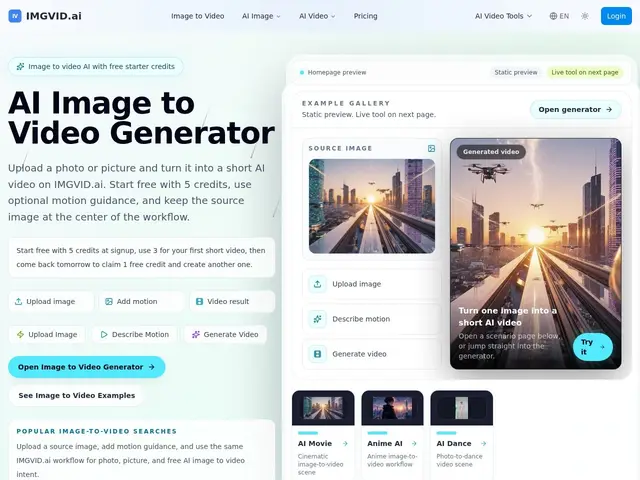
Description
If you've ever wanted to bring a photo to life — make someone in a picture wave, turn a product shot into a spinning showcase, or animate a still illustration into a short clip — IMGVID.ai does exactly that. You upload one image, optionally type a sentence describing the motion you want ("turn toward the camera and smile"), and it renders a few seconds of video. No editing timeline, no keyframes, just an upload and a prompt.
Under the hood, IMGVID.ai is a thin, focused wrapper around two of the strongest image-to-video models available today — ByteDance's Seedance 2.0 and Google's Veo 3.1 — rather than a model of its own. That's a deliberate trade-off: instead of building and training a video model, it packages ready-made workflows (anime animation, photo-to-dance, cinematic camera moves, product spins) on top of those two engines and a simple credit system. New accounts get 5 free credits (about one to two videos) with no card required, and a free credit refills daily, which is enough to genuinely test it before paying $2 for a small top-up or $14+ for a real batch of generations.
💬 Our review
The short version: IMGVID.ai isn't trying to out-model Runway or Luma — it's a fast, cheap front door to two already-excellent models (Seedance 2.0, Veo 3.1) for people who just want a photo turned into a clip without learning a full video-AI suite.
That positioning is honest and mostly works in its favor: because it doesn't maintain its own model, it can offer per-video pricing starting around a few cents per credit instead of a $20+/month subscription minimum, and the bundled workflows (anime, dance, product-spin) save time compared to writing your own prompts from scratch on a general tool. The catch is transparency — the homepage doesn't clearly break down which model costs how many credits before you commit, and the free daily credit is stingy enough that anything beyond casual use pushes you into paid packs quickly. Worth it if you want an occasional animated photo or product clip without signing up for Runway's subscription tiers; skip it if you need fine-grained control over camera motion or plan to generate video regularly, where a direct Runway or Luma subscription will end up cheaper and more predictable per video.
💰 Pricing
📊 Global score
🤖 AI-enriched data
Gratuit : 5 crédits à l'inscription + 1 crédit/jour (aucune CB). Starter : 2$ pour 12 crédits. Standard : 14$ pour 280 crédits. Professional : 39$. Enterprise : 99$. Une vidéo courte coûte environ 3 crédits.
Pros
Essai gratuit réel (5 crédits, sans carte bancaire)
Accès à deux modèles haut de gamme (Seedance 2.0, Veo 3.1) sans double abonnement
Workflows prêts à l'emploi (anime, danse, cinématique, produit)
Tarification à la vidéo plutôt qu'abonnement obligatoire
Cons
Répartition crédits/modèle peu transparente avant de générer
Crédit gratuit quotidien trop faible pour un usage régulier
Aucune API publique ni accès développeur
Pas de contrôle fin de la caméra comme sur Runway