mcdview
Drop in a SQL schema, Prisma file, or pgModeler export and get back an interactive, shareable ER diagram — no install, no account needed.
🔗 Visit mcdview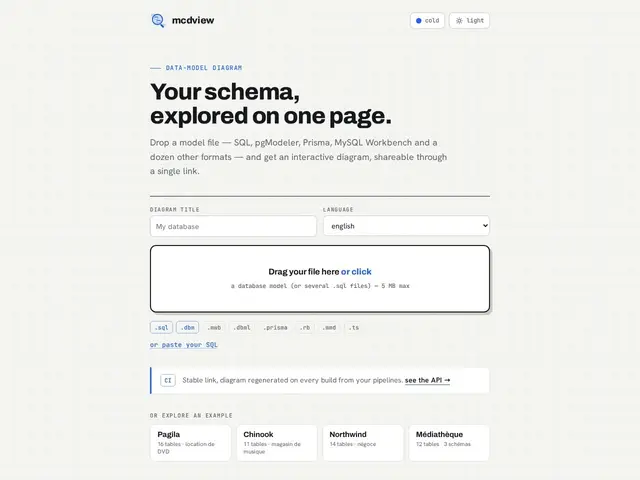
Description
Explaining a database to a new teammate, or just remembering how your own tables connect six months later, usually means either digging through raw SQL or opening a heavyweight desktop modeling tool. mcdview skips both: you drop a schema file in, and it turns it into a clean, interactive diagram you can share as a link, with foreign keys and relationships drawn out visually.
It accepts several common formats — raw SQL, Prisma schema files, pgModeler exports, and MySQL Workbench files — via drag-and-drop upload up to 5MB, and generates a shareable URL for the resulting diagram. For teams, it also plugs into CI/CD: you can wire it to regenerate the diagram automatically on each schema change, keeping a stable URL that always reflects the current state of the database rather than a stale screenshot from months ago. There's also an API for programmatic generation. It's an open-source project with its code public on GitHub, and ships with example databases (Pagila, Chinook, Northwind) so you can try it before touching your own schema.
💬 Our review
The short version: mcdview is a genuinely useful, free, no-friction tool for the specific job of turning a schema file into a diagram you can actually share with a link — worth bookmarking even if you already own a heavier modeling tool.
Compared to dbdiagram.io or DrawSQL, which cover similar ground but often gate collaboration or export behind paid tiers, mcdview's free, open-source, no-account model is the clear draw — you lose nothing by trying it on a real schema. Against full database design tools like pgModeler or MySQL Workbench (which it explicitly imports from), mcdview isn't trying to compete on modeling features; it's a viewer and sharer, not an editor, so you wouldn't use it to actually design a new schema from scratch. The CI/CD integration for auto-regenerating diagrams is the standout feature for teams — living documentation beats a static image pasted into a wiki that nobody updates. Pick mcdview when you need a quick, shareable, always-current diagram; pick a full modeling tool when you need to design the schema, not just visualize it.
💰 Pricing
📊 Global score
🤖 AI-enriched data
Free to use, open-source, no account required.
Pros
Free and open-source, no account needed
Supports multiple schema formats (SQL, Prisma, pgModeler, MySQL Workbench)
Shareable link output, easy to send to teammates
CI/CD integration keeps diagrams always up to date
API for programmatic use
Cons
Viewer/sharer, not a schema design/editing tool
No pricing/business model visible — sustainability of the free service is unclear
5MB upload limit could matter for very large schemas
Smaller community than established players like dbdiagram.io