VT Code
An open-source, Rust-built AI coding agent that runs in your terminal, with an optional browser-based editor that can only write to disk after you explicitly review and approve its changes.
🔗 Visit VT Code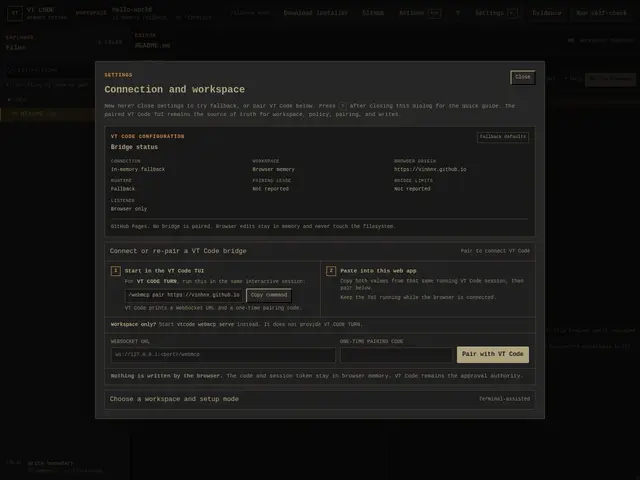
Description
VT Code belongs to the growing family of AI coding agents — tools like Claude Code or Aider — that let you describe a task in plain English and have an AI actually read your codebase, write the code, and run commands, instead of just suggesting snippets. What sets VT Code apart is where it lives (the terminal, not a browser tab or IDE plugin) and how cautious it is by design: even its optional web-based editor companion can only draft changes, never write them directly — a human has to review and approve a structured proposal first. Think of it as a capable junior developer who's required to show you the diff before touching any files.
Under the hood, VT Code is written in Rust and built as 21 crates around a Ratatui-based terminal UI. It supports over 30 LLM providers out of the box — Anthropic, OpenAI, Gemini, and Chinese providers like Moonshot and Qwen — plus fully local inference via Ollama, LM Studio, or llama.cpp for people who don't want to send code to a cloud API at all. Its safety layer includes a restricted shell sandbox, per-workspace approval gates, audit logging, and a provider whitelist. Beyond solo use, it supports the Model Context Protocol (client and server), custom Agent Skills and Plugins, worktree isolation for running several agents in parallel, and a structured /plan command for breaking down larger tasks. It's dual-licensed MIT/Apache-2.0 and integrates with Zed, VS Code, and Claude Code.
💬 Our review
The short version: a genuinely full-featured, actively maintained open-source terminal coding agent that takes safety seriously — a solid free alternative to Claude Code or Aider if you're comfortable living in a terminal and bringing your own API key.
At 826 stars and 80 forks with over 7,500 commits, VT Code is far more mature than most Show HN projects, and its scope is broad: 30+ LLM providers, local-model support, MCP, and editor integrations with Zed and VS Code put it in the same league feature-wise as Aider or Claude Code's CLI mode. The WebMCP browser-editor bridge with mandatory human approval is a genuinely distinctive safety feature most competitors don't emphasize as explicitly. The catch is that VT Code itself is free, but it isn't a complete free lunch — you still pay your LLM provider per token unless you run local models via Ollama, which will be slower and less capable than frontier cloud models. It's also a newer name than Aider or Claude Code, so its long-term prompt-engineering quality and provider-specific tuning are less battle-tested. For developers who want maximum provider flexibility, including local-only, privacy-preserving setups, and terminal-native workflows, it's a strong, zero-cost pick to evaluate.
💰 Pricing
📊 Global score
🤖 AI-enriched data
VT Code itself is free and open source (MIT OR Apache-2.0); you pay your chosen LLM provider (Anthropic, OpenAI, Gemini, etc.) per API usage, or run fully local/free models via Ollama, LM Studio, or llama.cpp
Pros
Free and open source (MIT/Apache-2.0) with no vendor lock-in — 30+ LLM providers plus local inference
Strong safety model: sandboxed shell, approval gates, audit logging, and human-reviewed WebMCP editing
Mature and actively developed — 826 stars, 80 forks, 7,500+ commits
Integrates with existing editors (Zed, VS Code) rather than forcing a new one
Cons
Terminal-first UX has a learning curve compared to IDE-integrated tools like Cursor
You still pay LLM API costs separately unless running local models (which are less capable)
Newer and less battle-tested than Aider or Claude Code for prompt quality/reliability
WebMCP browser editor is a secondary feature, not a full standalone IDE