DataZen
A desktop app for browsing and querying your databases that lets you ask questions in plain English instead of writing SQL, and works the same way whether your data is in Postgres, MySQL, MongoDB, or four other engines at once.
🔗 Visit DataZen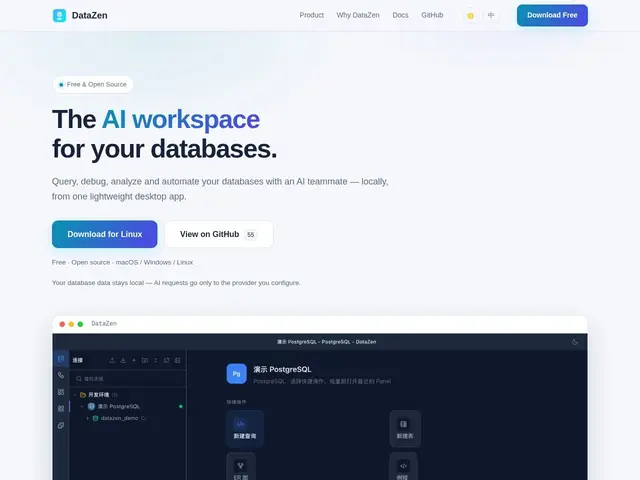
Description
Developers who work across more than one kind of database — say Postgres for the main app, Redis for caching, and MongoDB for some analytics collection — usually end up juggling three different client tools with three different query languages. DataZen tries to unify that into one lightweight desktop app: you connect PostgreSQL, MySQL, SQLite, Redis, MongoDB, or ClickHouse, and query, browse, and join across them from the same interface, with an AI layer that can translate a plain-English question into the right query for whichever database you're pointed at.
Beyond translation, it uses AI to explain SQL errors, analyze EXPLAIN plans and suggest indexes, and chart query results, alongside more traditional client features like ER diagrams and schema browsing. It also exposes an MCP server, so external AI agents (like a coding assistant) can query your databases through DataZen rather than you copy-pasting schema info into a chat window. It's fully open source under GPLv3, ships as a genuinely lightweight desktop app (under 15MB, starts in under a second), and keeps your actual data local rather than routing it through a cloud service — only the AI provider call itself (which you configure) sees anything, and even that's optional.
💬 Our review
The short version: DataZen's cross-database-in-one-tool pitch plus a genuinely useful AI layer (error diagnosis, index suggestions, natural-language queries) makes it a strong pick if your work spans multiple database engines, and being open source and local-first is the right call for a tool that touches your actual data.
Against general-purpose GUI clients like TablePlus or DBeaver, DataZen's AI assistance is the differentiator — those tools are solid at browsing and running queries but don't explain a cryptic Postgres error for you or suggest an index automatically. Against newer AI-native database tools like Outerbase, DataZen's advantage is being a genuinely local, open-source app rather than a hosted product, which matters if you're not comfortable with database credentials or schema touching a third-party cloud service. The tradeoff of supporting six different database engines in one lightweight client is that no single engine gets the depth of a dedicated tool (e.g. a Mongo-only client with deep aggregation-pipeline tooling) — worth it if you value the unified workflow over engine-specific depth.
💰 Pricing
📊 Global score
🤖 AI-enriched data
Free and open source under GPLv3. AI features require configuring your own AI provider.
Pros
One client for Postgres, MySQL, SQLite, Redis, MongoDB, and ClickHouse
AI-powered natural language to SQL and error diagnosis
Index suggestions from EXPLAIN plan analysis
Local-first, keeps your actual data off third-party clouds
Lightweight — under 15MB, sub-second startup
MCP server lets external AI agents query through it
Cons
Supporting six engines means less engine-specific depth than a dedicated client
AI features depend on configuring an external AI provider
Newer, smaller community than established GUI clients
Desktop-only, no hosted/team-shared version