Neoswarm
A Neovim-style terminal dashboard for managing and controlling multiple AI coding agents at once.
🔗 Visit Neoswarm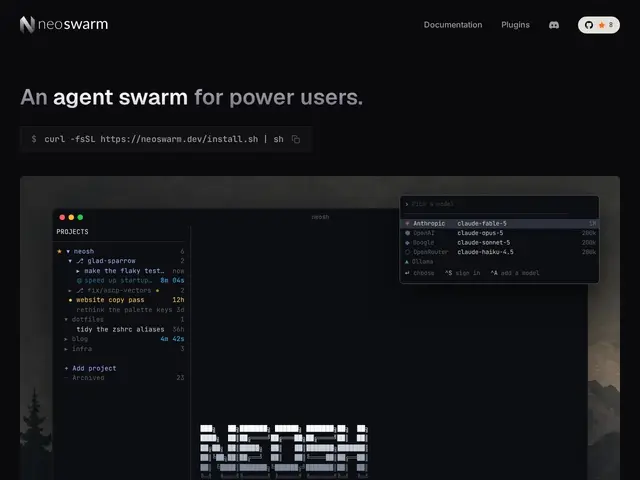
Description
Running several AI coding agents at once quickly turns into a mess of terminal tabs where you can't tell which agent is working on what. Neoswarm is a terminal-based control panel for exactly that situation: it's a TUI (text interface, not a website) that shows your projects, tasks, and which AI agent is assigned to each one, built for people who live in the terminal and want Neovim-style keyboard-driven control over their AI workflow.
It connects to multiple AI providers — Claude, OpenAI, Google, OpenRouter, or locally-run models via Ollama — rather than locking you to one, and keeps agents running in a persistent workspace even after you close the terminal window. It's extensible through a TypeScript plugin system, and the whole thing is free, open source, and MIT-licensed.
💬 Our review
The short version: built specifically for developers who already live in a terminal and want one Neovim-flavored dashboard for juggling multiple AI coding agents, rather than a general-audience tool.
The comparison set here is less 'other AI chat apps' and more 'how do you currently manage parallel AI agent sessions' — typically a pile of tmux panes or, more recently, dedicated orchestrators. Neoswarm's pitch is multi-provider support (not locked to one AI vendor) plus persistence (agents keep running after you close the terminal), which plain tmux setups don't give you. It's a good fit if you're already comfortable with Vim-style keybindings; if you're not, the learning curve alone may not be worth it versus a simpler GUI-based agent manager.
💰 Pricing
📊 Global score
🤖 AI-enriched data
Open source sous licence MIT.
Pros
Support multi-fournisseurs (Claude, OpenAI, Google, OpenRouter, Ollama)
Espace de travail persistant, les agents continuent après fermeture du terminal
Entièrement personnalisable, navigation façon Vim
Gratuit, open source (MIT), système de plugins TypeScript
Cons
Terminal uniquement, courbe d'apprentissage si on n'est pas habitué à Vim
Public de niche comparé à un gestionnaire d'agents en interface graphique
Projet récent, historique encore limité