Paseo
Imagine kicking off a coding task on your laptop before leaving your desk, then checking its progress and approving the next step from your phone on the train — without installing anything special on
🔗 Visit Paseo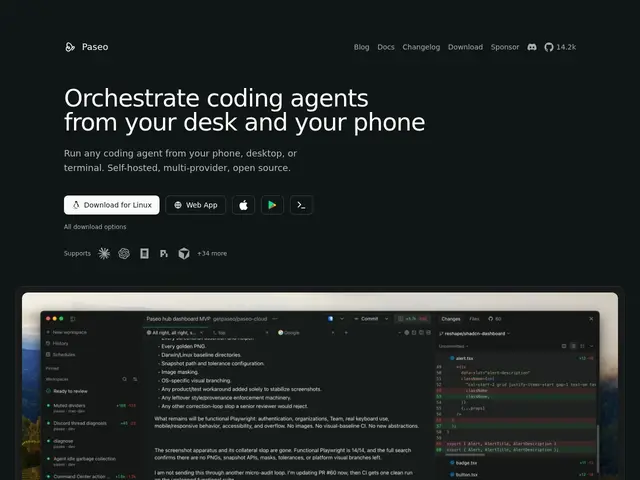
Description
Imagine kicking off a coding task on your laptop before leaving your desk, then checking its progress and approving the next step from your phone on the train — without installing anything special on the phone itself. That's what Paseo is for: it's a free, open-source layer that lets you run AI coding agents like Claude Code, Codex, or GitHub Copilot from any device — desktop, phone, browser, or terminal — while the actual work still happens on your own machine, in your own dev environment.
Paseo doesn't run agents in the cloud on your behalf; it orchestrates agents that execute locally as sandboxed subprocesses using your existing tools, configs, and API keys, then relays the session to whichever device you're on through an end-to-end encrypted connection. It supports more than 30 coding agents, isolates each session in its own git worktree, and works headless via a scriptable CLI for chaining agents into loops or scheduled runs — or with a bundled UI if you'd rather click than type. There's no telemetry, no forced account, and no vendor lock-in beyond the agents you choose to run.
💬 Our review
The short version: if you already run Claude Code or Codex from your terminal and wish you could check on it from your phone, Paseo does that for free without sending your code to a third-party cloud.
The honest comparison is with tools like Claude Desktop or the Codex app, which give you one agent in one polished client tied to one vendor. Paseo trades that polish for range — 30+ supported agents, real git worktree isolation, and genuinely cross-device parity, since your code and execution stay local rather than moving to someone else's servers. That local-first design is also its main limitation: Paseo doesn't provide any agent infrastructure itself, so if Anthropic or OpenAI changes rate limits or pricing on their end, Paseo can't shield you from that — you're still fundamentally bound by each provider's own terms. For a solo developer or small team juggling several agents across devices, Paseo is worth installing since it costs nothing and adds real flexibility; if you're happy with a single agent in a single app, there's no urgent reason to switch.
💰 Pricing
📊 Global score
🤖 AI-enriched data
Open source, gratuit. L'utilisateur fournit ses propres identifiants pour les agents supportés (Claude, Codex, etc.).
Pros
Parité complète desktop/mobile/web/CLI
Relais chiffré de bout en bout
Code et exécution restent en local
Isolation par git worktree
CLI scriptable, fonctionne en mode headless
Cons
Aucune infra d'agent propre, dépend des fournisseurs externes
Limité aux agents explicitement supportés
Soumis aux politiques et limites de chaque fournisseur IA