Artboard Studio
A browser tool that drops your design onto a realistic mockup — a laptop screen, a t-shirt, a coffee cup — so you can show it off without owning Photoshop or a studio setup.
🔗 Visit Artboard Studio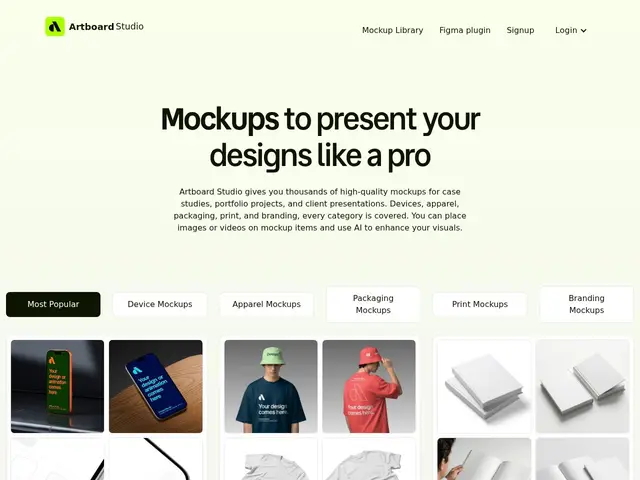
Description
Showing off a design usually means more than a flat screenshot — you want it to look like it's actually on a phone screen, a poster, or a branded mug. Traditionally that meant owning Photoshop and hours spent aligning layers on a mockup PSD file. Artboard Studio replaces that with a browser editor: pick from thousands of ready-made scenes, drop your image or design in, and export a polished result in seconds — no software to install.
Artboard Studio offers over 5,000 mockup templates spanning devices, apparel, packaging, print and branding, editable in an online drag-and-drop editor. It exports to PNG, JPEG, WEBP, MP4 and WEBM (including animated video mockups), and integrates directly into Figma and Adobe Express as plugins so designers can generate mockups without leaving their existing workflow. It also includes an AI mockup generator for creating scenes from a text description. Pricing runs from a free tier through Lite ($9/mo annual), Pro ($19/mo, unlimited exports) and a one-time Lifetime plan ($129).
💬 Our review
The short version: if you need polished, realistic product mockups for a portfolio or client presentation and don't want to fight Photoshop layer masks, Artboard Studio's 5,000+ ready-made scenes and Figma plugin make this a fast, affordable shortcut.
Against the traditional workflow — buying individual mockup PSDs and editing them in Photoshop — Artboard Studio's advantage is speed and accessibility: no software, no layer-masking skills, just drag your design in and export. Compared to competitors like Smartmockups or Placeit, its library size (5,000+) and native Figma/Adobe Express plugins are competitive, and the animated video mockup export is a nice differentiator for portfolio sites and social posts. The one-time Lifetime plan at $129 is a genuinely good deal if you'll use it regularly, avoiding an ongoing subscription. The catches are minor: the pricing and about pages returned 404s during review even though pricing details are listed on the homepage, and the free tier's limits push most regular users toward Lite or Pro fairly quickly. Best for freelance and agency designers who need frequent client-facing mockups without a Photoshop subscription; less relevant if you already own the Adobe suite and are comfortable building mockups manually.
💰 Pricing
📊 Global score
🤖 AI-enriched data
Free ; Lite $9/mois (annuel) ; Pro $19/mois (exports illimités) ; Lifetime $129 (paiement unique)
Pros
Plus de 5000 mockups (devices, apparel, packaging, print, branding)
Aucune installation logicielle requise, tout se fait dans le navigateur
Plugins Figma et Adobe Express pour rester dans son workflow existant
Export vidéo animé (MP4/WEBM) en plus des formats image classiques
Plan Lifetime à $129 en paiement unique, sans abonnement récurrent
Cons
Pages pricing/about retournant une erreur 404 au moment de la vérification
Palier gratuit limité, la plupart des usages réguliers nécessitent Lite ou Pro
Documentation d'aide peu accessible