Patapim
A desktop app that organizes every Claude Code, Codex or Gemini CLI terminal you're running into one cockpit with tabs, voice dictation and remote phone control — instead of a scatter of unlabeled terminal windows.
🔗 Visit Patapim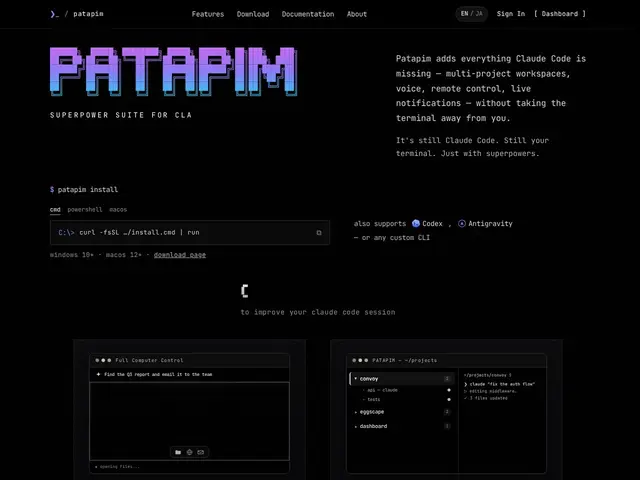
Description
Running multiple AI coding agents at once usually means a desktop cluttered with unlabeled terminal windows, no way to tell which is doing what, and no way to check in from your phone. Patapim organizes real CLI sessions (Claude Code, Codex, Gemini CLI, Antigravity or any CLI you add) into project folders with color-coded tabs or a grid view, each terminal keeping its own state across restarts.
Beyond organization, it adds fully local voice dictation for talking to your agents, zero-setup Telegram/WhatsApp bot notifications that route replies back to the right terminal, an embedded browser with your logged-in sessions so agents can act on real websites, scheduled commands, and opt-in full computer control (with an explicit warning and an emergency kill switch) that lets an agent click, type and navigate apps end-to-end. It's built on your existing Claude subscription rather than metered API billing. Pricing is Free (3 terminals, full computer control and remote access included, 30-minute dictation buffer), Pro at $6.99/month (unlimited terminals and dictation), and a $59.99 one-time Lifetime option.
💬 Our review
The short version: Patapim's core value — turning a scatter of terminal windows into an organized, remotely-controllable cockpit — is a real quality-of-life fix for anyone running more than one or two AI coding agents at once, and $6.99/month (or $59.99 lifetime) is cheap for what it replaces.
The honest alternative is tmux or a terminal multiplexer plus manual window management, which is free and infinitely customizable but requires real setup effort and gives you none of Patapim's phone-remote-control or voice dictation. The full computer control feature is the one to treat carefully — letting an AI agent click and type across your entire machine is powerful but genuinely risky if a session misbehaves, which is presumably why the kill switch exists; it's a feature to opt into deliberately, not casually. For a developer already running Claude Code, Codex and Gemini CLI in parallel across multiple projects, the organizational and remote-access value alone likely justifies the low price; a developer running one agent at a time in one terminal doesn't need this yet.
💰 Pricing
📊 Global score
🤖 AI-enriched data
Free : 3 terminaux, contrôle total de l'ordinateur et accès distant inclus, 30 min de dictée. Pro : 6,99 $/mois (terminaux et dictée illimités). Lifetime : 59,99 $ paiement unique.
Pros
Organise les sessions CLI par projet avec onglets et vue grille
Dictée vocale 100% locale, notifications Telegram/WhatsApp
Accès distant depuis le téléphone, zéro configuration
Basé sur l'abonnement Claude existant, pas de facturation API au token
Cons
Contrôle total de l'ordinateur = risque réel si un agent dérape
Nécessite ses propres abonnements aux CLI IA (Claude, Codex...)
Utile surtout à partir de 2+ agents lancés en parallèle
Application desktop supplémentaire à faire confiance avec un accès large