Qursor
Click on any button or text on a website and instantly get its exact styling details — copied in a format an AI coding assistant can actually use — instead of taking a screenshot and hoping the AI guesses right.
🔗 Visit Qursor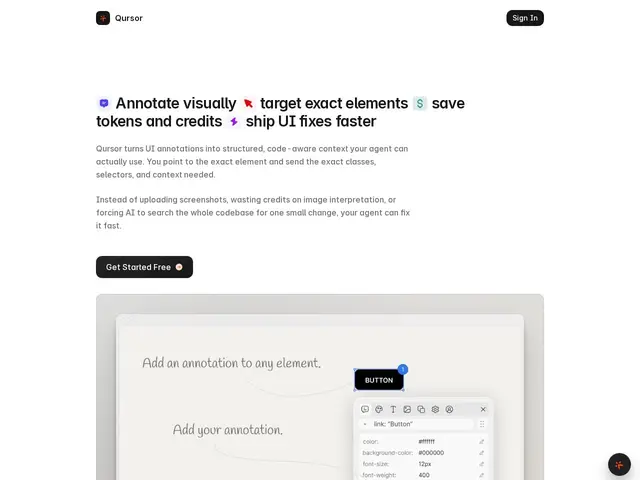
Description
When you ask an AI coding assistant to "make this look like that button on this other website," it's usually guessing from a screenshot, which wastes tokens and produces approximate results. Qursor fixes this specific, narrow problem: it's a Chrome extension that lets you click any element on any live webpage and instantly copy its actual DOM structure, CSS, fonts, and spacing as clean, structured text an AI can read precisely, or export the element outright as HTML, CSS, or React-ready JSX.
It's a small, focused developer tool rather than a broad platform — no dashboards, no team features, just a point-and-click workflow for pulling precise UI context out of any site (including localhost during development) and into an AI coding assistant's context window. Pricing is unusually simple for this category: a genuinely limited free tier (3 picks per day), then $29/year or a $39 one-time lifetime purchase for unlimited use — cheap enough that the decision to pay barely requires justification.
💬 Our review
The short version: Qursor solves one real, specific annoyance — describing a website's exact styling to an AI in words — cleanly and at a price so low it's barely worth debating, though it only handles visual/CSS context, not the actual application logic behind a UI.
There's no direct competitor doing exactly this; the alternative is manually opening browser DevTools, copying values by hand, and formatting them yourself, or just screenshotting and letting the AI guess — both slower and less precise than Qursor's one-click structured export. Design handoff tools like Figma or Zeplin solve an adjacent problem (design files to code) but require the design to already exist in the tool, whereas Qursor works on any live site including competitors' products or your own already-shipped app. The free tier's 3-picks-per-day cap will feel tight the moment you're actually using this regularly, at which point the $39 lifetime option is cheap enough that most users will just buy it rather than manage the daily limit. Genuinely useful for any developer regularly asking AI assistants to replicate existing UI patterns; not relevant if your work rarely involves matching an existing website's look.
💰 Pricing
📊 Global score
🤖 AI-enriched data
Gratuit : 3 sélections par jour, color picker, détection de police, téléchargement d'assets, copie de composants. Annuel : 29$/an, sélections illimitées, toutes fonctionnalités. À vie : 39$ paiement unique, sélections illimitées.
Pros
Extraction unifiée du DOM et du CSS en un seul outil
Formats d'export multiples (HTML/CSS/JSX) pour intégration directe
Tarification extrêmement accessible (29$/an, 39$ à vie)
Fonctionne sur n'importe quel site en direct, sans fichier de design requis
Cons
Limité au navigateur Chrome
Palier gratuit restreint à 3 sélections par jour
Capture uniquement l'UI, pas la logique métier ou le backend