Docsie
A tool that turns a Zoom recording or a PDF into a proper, structured how-to article or SOP automatically, instead of someone manually transcribing and formatting it.
🔗 Visit Docsie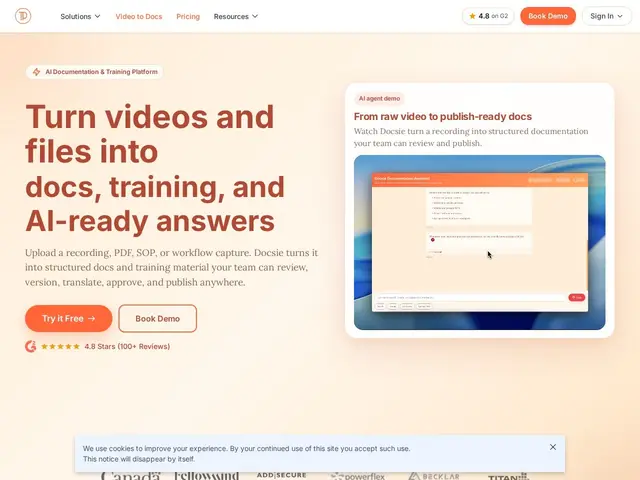
Description
Writing internal procedures and product documentation from scratch is slow, and most companies already have the source material sitting in a recorded meeting or an old PDF that nobody has bothered to turn into a searchable doc. Docsie's core idea is to feed it those raw materials — a Zoom, Loom, or Teams recording, a PDF, a screen capture — and have AI generate structured documentation, SOPs, or training material from it, which someone then reviews and approves before publishing.
It's built around a credit-based AI usage model layered on top of a standard documentation platform: version control, multi-channel publishing, and collaborative review workflows are the base, and AI credits (25,000 free, up to millions on paid tiers) meter how much of the video-to-doc and translation generation you can do. It leans enterprise — SAP, Oracle, Salesforce, and ServiceNow integrations are listed explicitly, and regulated industries like healthcare, pharma, and finance are called out as target users, with SCORM export available for formal compliance training.
💬 Our review
The short version: Docsie's video-to-documentation pipeline is a genuinely useful idea if your organization already has a backlog of recorded walkthroughs nobody wrote down, but the AI-credit pricing model means your actual cost depends on usage in a way that's harder to predict than a flat per-seat price.
Against Document360, which also offers AI writing assistance, Docsie's specific edge is multimodal input — it explicitly handles video and screen recordings as source material, not just text prompts, which matters if your "documentation" currently lives as a folder of unwatched Loom videos. Against GitBook or Notion, Docsie is more clearly aimed at regulated, enterprise documentation (SCORM export, SSO, audit logs) than at lightweight team wikis. The credit system is the main thing to watch: the free tier's 25,000 credits and even the $170/month Premium tier's 300,000 credits can get consumed faster than expected if you're converting a lot of video, and the jump to Organization at $750/month is steep if you outgrow Premium. Strong fit for a company sitting on unstructured training video that needs to become real SOPs; less compelling if your documentation need is straightforward text authoring, where a flat-rate tool avoids the credit-tracking overhead entirely.
💰 Pricing
📊 Global score
🤖 AI-enriched data
Gratuit : 25 000 crédits IA, domaine personnalisé. Premium : 170$/mois (2 040$/an) — 300 000 crédits IA, 15 membres, 3 sites, 50 Go. Organization : 750$/mois (9 000$/an) — 2M crédits IA, 90 utilisateurs, 10 espaces, SSO. Enterprise : sur devis, illimité, déploiement cloud ou on-premise.
Pros
Génération IA multimodale : vidéo, PDF, captures d'écran vers documentation
Traduction et marque blanche disponibles sur de nombreuses langues
Sécurité entreprise : chiffrement, GDPR, journaux d'audit, SSO/SAML
Large écosystème d'intégrations (40+ plateformes entreprise)
Cons
Paliers Premium et Organization coûteux pour petites équipes
Système de crédits IA ajoutant une charge de suivi et d'anticipation
Tarification Enterprise sur devis uniquement