superfile
A file manager that lives entirely in your terminal — browse, copy, move and preview files with a polished, keyboard-driven interface, without ever having to switch to your operating system's regular file explorer.
🔗 Visit superfile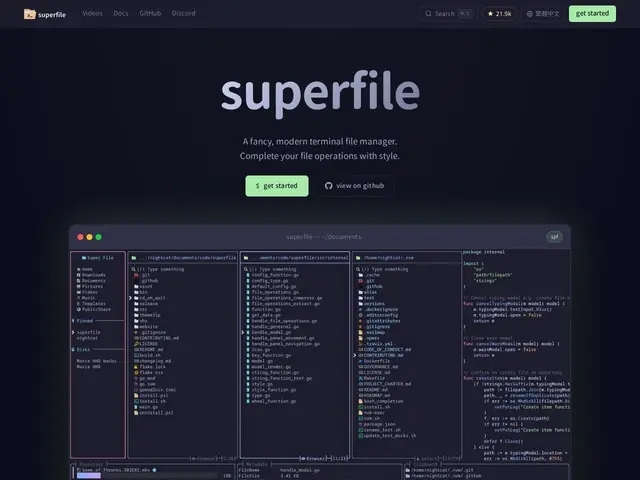
Description
For people who spend most of their day in a terminal, tabbing out to a graphical file manager to move or rename a batch of files breaks the flow. superfile is a terminal-based file manager built with Go and the Bubble Tea framework, designed to look and feel as polished as a graphical app while staying entirely keyboard-driven and fast, so you never have to leave the terminal to manage files.
It supports the everyday file operations (copy, move, delete, rename, fuzzy search, bulk operations) plus image preview directly in the terminal, splits into multiple panels so you can view and copy between directories side by side, and is fully customizable — every hotkey, border and color can be remapped, with over 20 built-in themes including Catppuccin, Nord, Tokyo Night and Dracula. It's free, open source under the MIT license, with the code on GitHub.
💬 Our review
The short version: superfile is free, open source, and clearly built with real design care for a terminal tool — the image preview and multi-panel support in particular go further than most terminal file managers bother to, and there's zero cost to trying it.
It's entering a space with well-established alternatives like ranger, nnn and lf, all of which are also free, open source and have years of plugin ecosystems and community configs behind them. superfile's edge is polish and approachability — a more modern, prettier default experience — rather than raw feature novelty, which makes it an easy recommendation for anyone finding those older tools' learning curve steep, and a lower-stakes try for anyone already comfortable in one of them.
💰 Pricing
📊 Global score
🤖 AI-enriched data
Gratuit et open source, licence MIT
Pros
Gratuit, open source, licence MIT
Prévisualisation d'images directement dans le terminal, panneaux multiples
20+ thèmes intégrés, tous les raccourcis personnalisables
Cons
Concurrents établis (ranger, nnn, lf) avec écosystèmes de plugins plus anciens
Avantage principalement esthétique/ergonomique plutôt que fonctionnel
Nécessite d'être à l'aise dans un terminal pour en tirer parti