Mux0
A terminal built specifically for running several AI coding agents (like Claude Code) at once, showing you at a glance which ones are still working, which need your input, and which just finished, instead of you tabbing between plain terminal windows gues
🔗 Visit Mux0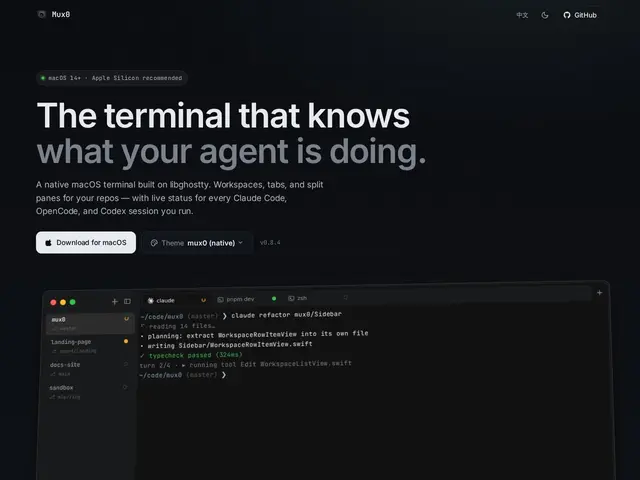
Description
Running multiple AI coding agent sessions in parallel — say, Claude Code working on three different branches at once — quickly turns into a mess of terminal tabs where you can't tell which one needs your attention without clicking into each one. Mux0 is a native macOS terminal built around exactly that workflow: it shows live status per session (running, idle, needs input, succeeded, failed) directly in a project-organized sidebar of workspaces, tabs and splits, so you know where to look without switching windows blind.
Under the hood it's a GPU-rendered terminal built on libghostty with Metal rendering, supports zsh/fish/bash with OSC 7 directory tracking, shows git branch/PR/notification metadata alongside your sessions, persists your layout across restarts, and works entirely offline via local Unix domain sockets. It's free for personal and commercial use under a source-available (non-redistributable) license, with the source itself viewable on GitHub even though it's not open for redistribution.
💬 Our review
The short version: as AI coding agents become normal to run several-at-once, a terminal that actually tracks agent state (not just raw text output) is solving a real, fresh problem that Terminal.app, iTerm2 and even Warp weren't built for — this is a genuinely new niche rather than a repackaged old idea.
Warp is the closest comparison in spirit (a modernized, feature-rich terminal), but Mux0's specific bet is narrower and timelier: live status tracking across multiple concurrent AI agent sessions specifically, which is a use case that barely existed two years ago. Being free (personal and commercial) with GPU-accelerated rendering makes it an easy, no-cost trial for anyone already running multiple Claude Code or Codex sessions in parallel — the main open question is whether the workflow habit (checking a sidebar instead of memorizing tab order) actually saves time once you've used it for a week.
💰 Pricing
📊 Global score
🤖 AI-enriched data
Gratuit pour usage personnel et commercial ; licence source-disponible (non redistribuable)
Pros
Suivi en temps réel de l'état de chaque session d'agent IA
Rendu GPU (Metal) via libghostty, très réactif
Gratuit, même en usage commercial
Cons
Niche très spécifique (utile seulement si on fait tourner plusieurs agents en parallèle)
Licence source-disponible, pas open source classique (pas de fork/redistribution)
macOS uniquement