ShotMark
Turns "it's broken, here's a screenshot" into everything an AI coding assistant needs to actually fix the bug, in one click.
🔗 Visit ShotMark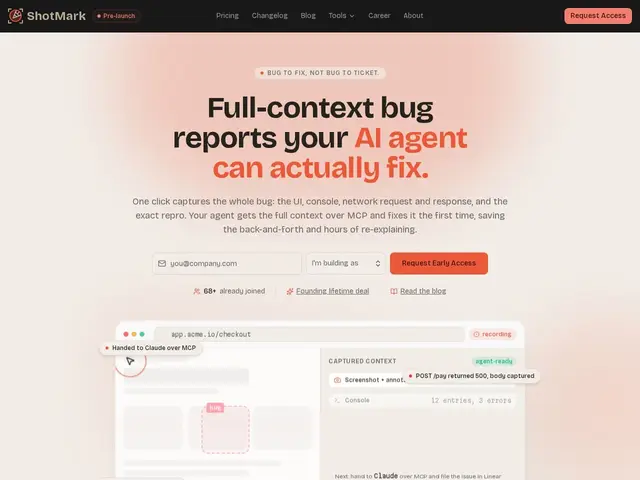
Description
Anyone who has ever filed a bug report knows the back-and-forth: "can you send the console log?", "what browser?", "can you reproduce it?" ShotMark exists to skip that entire conversation. One click captures a screenshot, the browser console errors, the network requests that failed, the steps that led to the bug, and the browser/OS details — then packages all of it into a single report an AI coding agent (or a human developer) can act on immediately.
It integrates with Claude and Cursor via the Model Context Protocol (MCP), so an AI agent can pull the full bug context directly and attempt a fix, then hand back a pull request for review. It can also file issues straight into GitHub, Linear, or Jira, and offers an embeddable widget so a product's own users can submit structured bug reports instead of vague emails. The product is currently in pre-launch with a private beta and a "founding lifetime deal" for early subscribers.
💬 Our review
The short version: if your team (or your AI coding agent) spends real time reconstructing what actually went wrong from a two-line Slack message, ShotMark removes that entire step by capturing everything upfront.
It sits in a young but growing category of "context capture for AI agents" tools — its differentiator against a generic screenshot tool or a heavier QA platform like BugHerd is the explicit MCP integration, which is squarely aimed at teams already using Claude or Cursor as part of their dev workflow rather than at traditional human-only QA teams. Being pre-launch/private beta is the real caveat here: the founding lifetime deal pricing is attractive if it ships and sticks around, but there's inherent early-stage risk in adopting a tool before it has a stable public release. <!-- ai-generated -->
💰 Pricing
📊 Global score
🤖 AI-enriched data
Founding lifetime deal mentionné pour les early adopters, montant non public
Pros
Capture en un clic de tout le contexte du bug
Intégration MCP native pour agents IA
Dépôt direct des issues sur GitHub/Linear/Jira
Widget intégrable pour retours utilisateurs
Cons
Encore en pré-lancement, pas de tarifs publics
Utile surtout si l'équipe utilise déjà des agents IA de code
Produit jeune, fonctionnalités susceptibles d'évoluer