CreateVision AI
An AI image and video generator that tries to remove the hardest part of these tools — figuring out the right words to type — by letting a built-in assistant named Ava pick the right model and settings for you from a plain description.
🔗 Visit CreateVision AI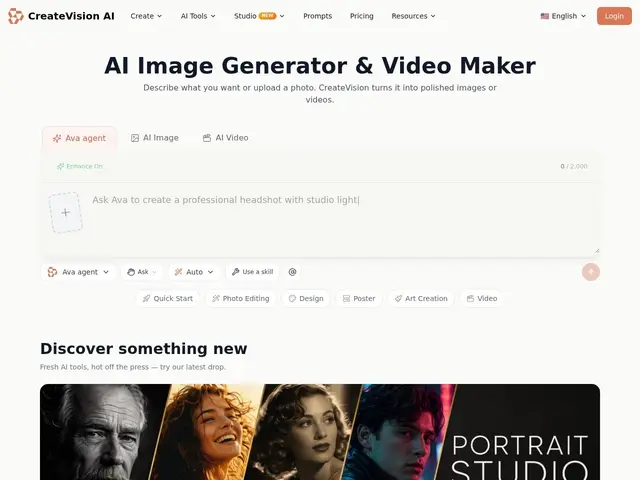
Description
AI image and video generators are powerful but often require learning a specific vocabulary of "prompt engineering" to get good results, and picking the right underlying model for a given job (photorealism vs. illustration vs. video) is its own skill. CreateVision AI tries to remove that barrier: you describe what you want or upload a photo, and an assistant called Ava interprets your intent, plans the shot, and automatically routes the job to whichever of its models suits it best — more like briefing a creative assistant than operating specialized software yourself.
Under the hood it bundles 30+ specialized tools (background removal, face swap, upscaling), 15,000+ starting templates, 28 named "AI Mentor" personalities meant to emulate different artistic styles, and multiple underlying generation models with automatic routing, including a "Z Image Turbo" model offered with unlimited generations on the free plan. The free tier gives 80 daily credits (400/month); paid plans start at $19/month for a Premium tier (1,600 daily / 8,000 monthly credits), with an Ultimate tier above that (4,000 daily / 18,000 monthly).
💬 Our review
The short version: the free tier's unlimited Z Image Turbo generations are a genuinely good way to test whether this fits your workflow before paying anything, which is more generous than most competitors in this space offer.
Against Midjourney or Runway, both of which assume you'll learn their prompt conventions and reward that investment with more granular control, CreateVision AI's Ava-assisted routing trades some control for accessibility — better for someone who wants a decent result fast without becoming a prompt-engineering expert, worse if you're a professional who wants to fine-tune every parameter. Against Canva AI, which is similarly accessibility-focused but embedded inside a broader design suite, CreateVision is more narrowly about generation itself. The catch with any "auto-routes to the best model" pitch is you're trusting the platform's judgment over your own — for casual content it's a fair trade, for a brand's flagship visuals it's worth spot-checking against a tool where you pick the model yourself.
📊 Global score
🤖 AI-enriched data
Gratuit : 80 crédits/jour (400/mois), générations illimitées sur le modèle Z Image Turbo. Premium : 19 $/mois (1 600 crédits/jour, 8 000/mois). Ultimate : palier supérieur (4 000 crédits/jour, 18 000/mois).
Pros
Générations illimitées gratuites sur un modèle dédié
Assistant Ava évite le prompt engineering
30+ outils intégrés (détourage, face swap, upscaling)
15 000+ templates
Cons
Moins de contrôle fin que Midjourney/Runway
Valeur des "mentors IA" difficile à évaluer sans test
19 $/mois comparable aux concurrents établis, pas moins cher
Routage automatique = moins de transparence sur le modèle utilisé