Portero
Free, open-source macOS app for monitoring all active listening TCP/UDP ports with process identification and firewall control.
🔗 Visit Portero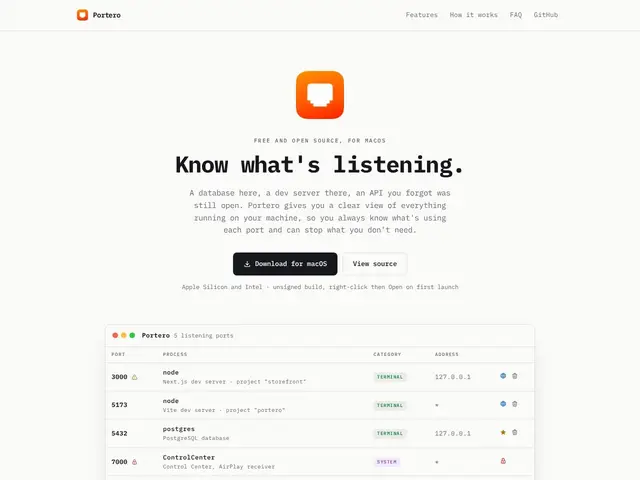
Description
Ever wonder what's actually listening on your Mac's network ports — and whether it's safe? Portero puts a plain-English face on that question: instead of a terminal full of cryptic process IDs, you get a list of open ports with the actual app name attached, a way to kill anything suspicious, and one-click access to whatever's running on localhost.
Portero is a free, open-source macOS app (Rust/Tauri) that monitors active TCP/UDP listening ports, maps them to human-readable process names, and integrates with the system firewall without touching system files directly. It ships in English and Portuguese and includes conflict detection plus safe process termination for hundreds of commonly recognized applications.
💬 Our review
The short version: Portero is exactly what it looks like — a free, no-nonsense port monitor for developers who are tired of parsing lsof output by hand, and there's no catch because it's fully open-source.
Compared to Little Snitch, which is a full outbound firewall with a learning curve and a price tag, Portero is narrower and free: it watches listening ports, not all traffic, and it's built for quick diagnosis rather than ongoing network policy enforcement. If you just want to know what's eating port 3000 again, Portero solves that in seconds; for deeper network control, you'll still want something like Little Snitch alongside it.
📊 Global score
🤖 AI-enriched data
100% free, open-source, no paid tiers
Pros
Completely free and open-source
Lightweight Tauri app (Rust backend) with minimal resource overhead
Recognizes hundreds of common applications with human-readable names
Built-in firewall integration without modifying system files
One-click browser launcher for HTTP services
Cons
macOS-only (no Windows/Linux support)
Limited to local port monitoring (no remote monitoring)
Depends on macOS native tools (lsof, ps, pfctl)