Instruct AI
A no-code tool where you describe a task in plain English and an AI agent carries it out across your apps, like Gmail, your calendar, or your CRM.
🔗 Visit Instruct AI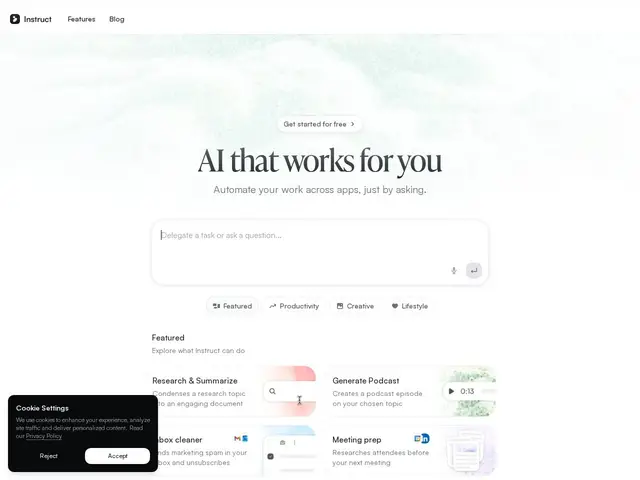
Description
Most automation tools (think Zapier) still make you wire together triggers and actions in a visual builder before anything runs. Instruct AI skips that step: you type what you want done in plain English, something like "summarize my unread emails and put the important ones on my calendar," and an AI agent figures out which apps to touch and executes it, no flowchart required.
Instruct AI is a no-code AI agent builder aimed at teams in education, recruiting, sales, and operations who want to automate multi-step, cross-app work without engineering resources. It connects to tools like Gmail, Outlook, Google Calendar, LinkedIn, HubSpot, Google Drive, and Ashby, and ships pre-built templates for common jobs such as research and summarization, podcast generation, inbox cleanup, and meeting prep, which lowers the barrier for non-technical users versus building an agent from scratch. There's a free plan, and paid tiers exist for more usage or features, though exact pricing isn't published on the site. The copyright footer shows 2026, consistent with a recently launched product, and there's no independently verifiable user or revenue data yet.
💬 Our review
The short version: if your team already loses hours to repetitive, describable cross-app busywork and doesn't have engineering time to build proper automations, Instruct AI's natural-language approach is genuinely lower-friction than a visual workflow builder, but the hidden pricing and lack of a track record mean you should pilot it on non-critical tasks first.
Against Zapier, the category incumbent, Instruct AI trades Zapier's precise, auditable trigger-action logic for the convenience of typing a request in English, a real usability win for non-technical staff, but a risk when the agent has to interpret an ambiguous instruction correctly every time, especially for anything touching customer data or finances. Against other AI-agent builders, its differentiator is the pre-built templates for specific workflows (inbox cleanup, meeting prep, podcast generation) rather than a blank canvas, which is friendlier for beginners but less flexible for power users who want granular control. Because pricing tiers aren't disclosed and the product looks freshly launched (2026 copyright, no independently verifiable usage numbers), the honest move is to run it on a free-tier pilot for a low-stakes workflow before trusting it with anything customer-facing.
💰 Pricing
📊 Global score
🤖 AI-enriched data
Plan gratuit disponible ; paliers payants existants mais grille tarifaire non publiée sur le site
Pros
Instructions en langage naturel, pas de builder visuel à apprendre
Modèles prêts à l'emploi pour des tâches courantes (résumé mail, prep réunion, podcast)
Intégrations larges : Gmail, Outlook, Calendar, LinkedIn, HubSpot, Drive, Ashby
Plan gratuit pour tester avant de payer
Cons
Grille tarifaire des plans payants non publiée
Logique d'agent moins auditable/prévisible qu'un builder visuel type Zapier
Produit visiblement récent (copyright 2026), pas d'historique de fiabilité
Chiffres d'usage non vérifiables indépendamment