Haven
A free browser extension that quietly checks whether a link or website is actually what it claims to be, before you click, without asking you to configure anything.
🔗 Visit Haven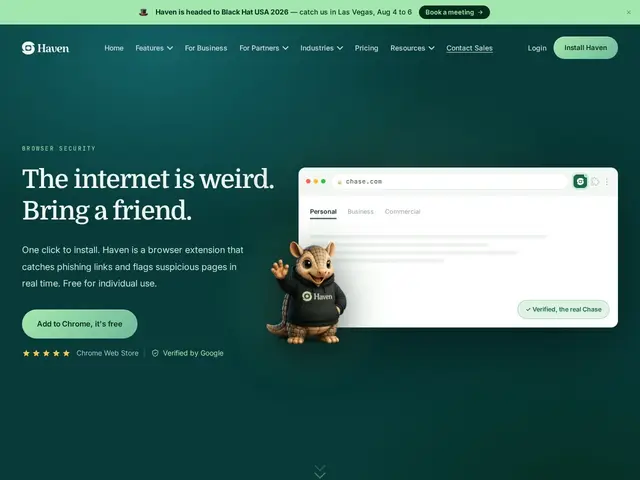
Description
Phishing has gotten harder to spot with the naked eye — a fake bank login page or a spoofed invoice email can look nearly identical to the real thing. Haven works in the background of your browser to check links and websites in real time, flagging the ones that don't match what they claim to be, so the decision doesn't rest entirely on a user noticing a subtle red flag under time pressure.
Haven is a free Chrome extension operated by MirrorTab, Inc. offering real-time link and website verification with visual indicators, auto-protection across 200+ pre-verified trusted sites (banking, email, tax, healthcare, government), AI-powered phishing detection inside Gmail and Outlook that evaluates sender context and urgency signals, and automatic blocking of risky browser extensions on protected sites. It requires no manual configuration, works silently in the background, supports unlimited devices and team-member sharing, and is backed by investors including GV (Google Ventures), Alt Capital and Ludlow Ventures, with an Enterprise tier available for businesses and MSPs.
💬 Our review
The short version: Haven is a legitimately free, no-setup phishing protection extension backed by serious investors (Google Ventures among them), which is a meaningfully different value proposition than most "free" security tools that later paywall the useful features.
Against built-in browser phishing protection (Chrome Safe Browsing, Edge SmartScreen) and paid alternatives, Haven's edge is specificity and context: rather than a generic blocklist, it evaluates email context (sender, urgency signals, requested action) for Gmail/Outlook specifically, and pre-verifies 200+ high-risk categories like banking and tax sites rather than relying purely on reactive blocklists. Being entirely free for individuals with no credit card requirement removes the usual trust tax of a security tool asking for payment info upfront. The tradeoffs are the ones inherent to any young product: it's Chrome-only (no Firefox/Safari mentioned), the company is new enough that its long-term business model beyond the Enterprise tier isn't fully proven, and as with any phishing tool it can't catch everything — it reduces risk, not eliminates it. Solid, no-cost addition to a browser for anyone who wants an extra layer against phishing beyond built-in browser protection; businesses needing centralized management should look at the Enterprise tier specifically.
💰 Pricing
📊 Global score
🤖 AI-enriched data
100% gratuit pour usage individuel, aucune carte bancaire requise. Palier Enterprise sur devis pour entreprises/MSP.
Pros
Entièrement gratuit pour un usage individuel, sans carte bancaire
Backé par des investisseurs sérieux (GV/Google Ventures, Alt Capital, Ludlow Ventures)
Détection contextuelle du phishing dans Gmail/Outlook (pas juste une liste noire)
Fonctionne silencieusement, aucune configuration nécessaire
Cons
Chrome uniquement, pas de Firefox/Safari mentionné
Entreprise jeune, modèle économique long terme pas encore prouvé au-delà du palier Enterprise
Réduit le risque de phishing mais ne l'élimine pas complètement
Moins de recul que les protections natives des navigateurs (Chrome Safe Browsing)