Tictable
A spreadsheet that can quietly run real SQL underneath — load millions of rows, ask a question in plain English, and let the AI turn it into the right query and a live report.
🔗 Visit Tictable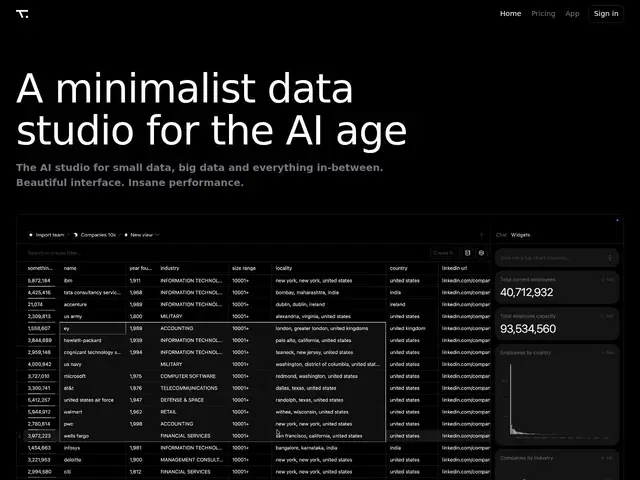
Description
Spreadsheets are easy to use but fall apart with millions of rows, while SQL is powerful but requires knowing the exact syntax and the exact table structure. Tictable tries to close that gap: it keeps the familiar grid of a spreadsheet, but underneath it's actually running SQL in the browser, and it lets an AI translate a plain-English question into the right query so you don't have to write it yourself.
Tictable is a browser-based data tool that loads large datasets — into the millions of rows — as read-only sheets and queries them instantly through an in-browser engine, without needing a separate database server. Users can either write custom SQL directly for precise control, or describe what they want in plain text and have it converted into a query or filter automatically, with the AI able to run hundreds of queries in real time to explore the data and generate live reports. It supports real-time collaboration for teams working on the same dataset. Tictable launched in 2026 and is also available as a desktop app for Mac and Windows.
💬 Our review
The short version: if your team knows spreadsheets but not SQL, and your data has outgrown what a normal spreadsheet can handle, Tictable lets you keep working the way you're used to while getting real query power underneath.
The pitch sits between two established categories — spreadsheets (familiar but limited at scale) and full BI/warehouse tools (powerful but require setup and SQL knowledge) — and Tictable's bet is that running SQL client-side in the browser, with AI translating plain-English questions into queries, removes the usual tradeoff. That's appealing for teams that don't want to stand up a data warehouse just to explore a few million rows. The main limitation worth flagging: Tictable's own homepage blocked automated access during this review, so pricing and some feature claims couldn't be independently verified beyond what's publicly described elsewhere — check current pricing directly on the site before committing. Best suited for analysts and small teams who want spreadsheet simplicity with SQL-scale performance; overkill if your data comfortably fits in Google Sheets already, and underpowered if you need full warehouse-grade BI with dashboards and scheduled reports.
💰 Pricing
📊 Global score
🤖 AI-enriched data
Le site bloque l'accès automatisé ; tarification à vérifier directement sur tictable.com
Pros
Combine simplicité tableur et puissance SQL réelle
Requêtes en langage naturel converties automatiquement en SQL
Charge des millions de lignes et interroge instantanément côté navigateur
Collaboration en temps réel entre plusieurs utilisateurs
Cons
Tarification non vérifiable (site bloquant l'accès automatisé)
Pas de dashboards ni de reporting planifié type BI complet
Outil récent (2026), retours d'usage encore limités
Date de fondation précise non communiquée