browse.sh
A library of "how-to" cheat sheets for AI agents browsing websites — instead of an agent fumbling around a new site from scratch every single time, it installs a ready-made recipe that already knows exactly which buttons to click.
🔗 Visit browse.sh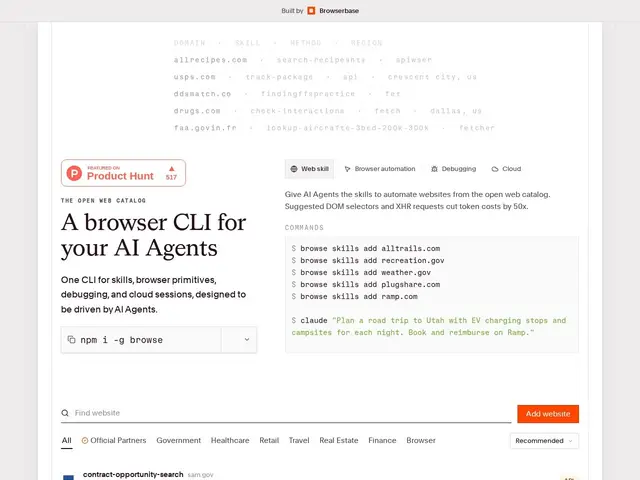
Description
Every time an AI agent visits a website it hasn't used before, it normally has to explore from zero — figuring out where the search box is, how checkout works, what the menu structure looks like — which is slow and burns a lot of tokens. browse.sh solves that by offering a shared library of pre-written "recipes" for hundreds of specific websites, so an agent can install one and skip straight to the shortest known path instead of re-discovering it.
browse.sh is an open catalog of 400+ production browser-automation "skills" (in a SKILL.md format) covering travel, e-commerce, finance, real estate, government, food, sports, and transportation sites, installable via a CLI (npm install -g browse) and built by Browserbase. Skills favor an API-first approach — hitting a site's REST/GraphQL/JSON endpoints directly where possible — which the project claims cuts token cost by roughly 50x versus naive browser automation, and it can run locally via Chromium or in Browserbase's cloud with stealth/proxy options. The skills repository itself (browserbase/skills) is public on GitHub with roughly 3,658 stars, though it's unclear whether the browse CLI tool itself is open source or just the skill catalog it draws from, and there's a read-only governance mode with explicit guardrails against ever executing payment or account-creation flows automatically.
💬 Our review
The short version: if you're building an agent that regularly hits the same handful of real-world websites (booking, shopping, government forms), browse.sh's pre-built skill catalog can save real token cost and reliability headaches versus having your agent re-explore each site cold every run.
Compared to a general browser-automation tool like Playwright or a stealth-focused platform like BrowserAct, browse.sh's differentiator is the shared, crowdsourced-style catalog of site-specific recipes rather than a blank automation framework you configure yourself — you benefit from work already done on hundreds of common sites rather than starting from zero on each one. The main things to verify before relying on it: pricing isn't published anywhere, the open-source status is genuinely mixed (the skills repo is public, but the core CLI's license is unclear), and since it's built by Browserbase, using it at scale likely nudges you toward their cloud browser product rather than staying purely local.
💰 Pricing
📊 Global score
🤖 AI-enriched data
Aucune grille tarifaire publiée — le catalogue de skills est public sur GitHub, mais le coût réel (notamment via Browserbase Cloud) n'est pas indiqué
Pros
400+ recettes prêtes à l'emploi pour des sites réels (voyage, e-commerce, gouvernement...)
Approche API-first — jusqu'à 50x moins de tokens qu'une automatisation navigateur classique
Catalogue de skills public sur GitHub (~3 658 étoiles)
Garde-fous explicites contre les actions de paiement/création de compte automatiques
Cons
Statut open source ambigu : catalogue public, mais licence du CLI principal floue
Aucune tarification publiée
Usage à l'échelle pousse probablement vers le produit cloud payant de Browserbase